<?xml version="1.0" encoding="utf-8"?>
<feed xmlns="http://www.w3.org/2005/Atom">
    <id>https://tunaos.org/blog</id>
    <title>TunaOS Blog</title>
    <updated>2026-08-12T00:00:00.000Z</updated>
    <generator>https://github.com/jpmonette/feed</generator>
    <link rel="alternate" href="https://tunaos.org/blog"/>
    <subtitle>TunaOS Blog</subtitle>
    <icon>https://tunaos.org/img/favicon.ico</icon>
    <entry>
        <title type="html"><![CDATA[Announcing Gurnard — Ubuntu 24.04 LTS with the Pantheon desktop]]></title>
        <id>https://tunaos.org/blog/announcing-gurnard-ubuntu-pantheon</id>
        <link href="https://tunaos.org/blog/announcing-gurnard-ubuntu-pantheon"/>
        <updated>2026-08-12T00:00:00.000Z</updated>
        <summary type="html"><![CDATA[The TunaOS variant catalog keeps growing — and this time it pairs the most]]></summary>
        <content type="html"><![CDATA[<p>The TunaOS variant catalog keeps growing — and this time it pairs the most
familiar LTS base in Linux with one of its most elegant desktops. Meet
<strong>Gurnard</strong> (🐟): Ubuntu 24.04 LTS (Noble Numbat) with the <strong>Pantheon</strong>
desktop, rebuilt as an atomic bootc image.</p>
<h2 class="anchor anchorTargetStickyNavbar_Vzrq" id="why-gurnard-exists">Why Gurnard exists<a href="https://tunaos.org/blog/announcing-gurnard-ubuntu-pantheon#why-gurnard-exists" class="hash-link" aria-label="Direct link to Why Gurnard exists" title="Direct link to Why Gurnard exists" translate="no">​</a></h2>
<p>Until now, if you wanted the Pantheon desktop — the calm, minimal environment
from elementary OS — you mostly had to run elementary OS itself. Gurnard is the
first widely-buildable way to get that desktop with a standard Ubuntu 24.04 LTS
base underneath, wrapped in a container-native, immutable core.</p>
<p>The result is a familiar Ubuntu with an atomic heart:</p>
<ul>
<li class=""><strong>Ubuntu 24.04 LTS</strong> base — the LTS with the longest support runway in the
catalog, on both x86_64 and arm64</li>
<li class=""><strong>Pantheon desktop</strong> — elementary's elegant, minimal desktop, pre-configured
out of the box</li>
<li class=""><strong>bootc core</strong> — atomic updates and rollback, the same container-native
foundation as the rest of the TunaOS line</li>
<li class=""><strong>Flathub and Homebrew pre-enabled</strong> — apps and tools ready to install the
moment you boot</li>
</ul>
<p>Gurnard currently ships as <strong>Experimental</strong> (<code>ghcr.io/tuna-os/gurnard:base</code> and
<code>ghcr.io/tuna-os/gurnard:pantheon</code>) — the right time to try it is now, before
the surface settles, because Pantheon on a non-elementary base is a new
packaging surface and we want your bug reports while they're cheap to fix.</p>
<h2 class="anchor anchorTargetStickyNavbar_Vzrq" id="how-to-try-it">How to try it<a href="https://tunaos.org/blog/announcing-gurnard-ubuntu-pantheon#how-to-try-it" class="hash-link" aria-label="Direct link to How to try it" title="Direct link to How to try it" translate="no">​</a></h2>
<div class="language-bash codeBlockContainer_Ckt0 theme-code-block" style="--prism-color:#393A34;--prism-background-color:#f6f8fa"><div class="codeBlockContent_QJqH"><pre tabindex="0" class="prism-code language-bash codeBlock_bY9V thin-scrollbar" style="color:#393A34;background-color:#f6f8fa"><code class="codeBlockLines_e6Vv"><div class="token-line" style="color:#393A34"><span class="token plain">sudo bootc switch ghcr.io/tuna-os/gurnard:pantheon</span><br></div></code></pre></div></div>
<p>Or browse the <a href="https://tunaos.org/gurnard" target="_blank" rel="noopener noreferrer" class="">Gurnard variant page</a> for install
instructions and image tags.</p>
<h2 class="anchor anchorTargetStickyNavbar_Vzrq" id="part-of-a-growing-line">Part of a growing line<a href="https://tunaos.org/blog/announcing-gurnard-ubuntu-pantheon#part-of-a-growing-line" class="hash-link" aria-label="Direct link to Part of a growing line" title="Direct link to Part of a growing line" translate="no">​</a></h2>
<p>Gurnard joins the catalog alongside <strong>Hummingbird</strong> (🐦, a container-native
bootc rebase of Fedora Hummingbird) — both new variants in the last week, and
both reminders that TunaOS is not one desktop's project. Every major base and
desktop pairing we can ship atomically, we will.</p>
<p>Questions, feedback, or a first contribution? We're on
<a href="https://matrix.to/#/%23tunaos:reilly.asia" target="_blank" rel="noopener noreferrer" class="">Matrix</a> and issues are open in
<a href="https://github.com/tuna-os/tunaOS" target="_blank" rel="noopener noreferrer" class="">github.com/tuna-os/tunaOS</a> —
<a href="https://github.com/tuna-os/tunaOS/issues?q=is%3Aissue+is%3Aopen+label%3A%22good+first+issue%22" target="_blank" rel="noopener noreferrer" class=""><code>good first issue</code></a>
and <code>help wanted</code> labels are live on the backlog.</p>]]></content>
        <author>
            <name>James Reilly</name>
            <uri>https://github.com/hanthor</uri>
        </author>
        <category label="tunaos" term="tunaos"/>
        <category label="gurnard" term="gurnard"/>
        <category label="ubuntu" term="ubuntu"/>
        <category label="pantheon" term="pantheon"/>
        <category label="elementary" term="elementary"/>
        <category label="bootc" term="bootc"/>
        <category label="immutable" term="immutable"/>
    </entry>
    <entry>
        <title type="html"><![CDATA[TunaOS on Apple Silicon — bootc images for M1/M2 Macs]]></title>
        <id>https://tunaos.org/blog/tunaos-on-apple-silicon</id>
        <link href="https://tunaos.org/blog/tunaos-on-apple-silicon"/>
        <updated>2026-08-12T00:00:00.000Z</updated>
        <summary type="html"><![CDATA[Apple Silicon Macs are, by some measures, the most common ARM Linux machines]]></summary>
        <content type="html"><![CDATA[<p>Apple Silicon Macs are, by some measures, the most common ARM Linux machines
in the world — and until recently they were mostly out of reach for TunaOS.
That changes with the work landing in
<a href="https://github.com/tuna-os/bootc-installer-asahi" target="_blank" rel="noopener noreferrer" class="">bootc-installer-asahi</a>:
a macOS-driven installer path that turns a TunaOS bootc image into a
bootable Asahi Linux setup on <strong>M1/M2 Macs</strong>.</p>
<h2 class="anchor anchorTargetStickyNavbar_Vzrq" id="the-short-version">The short version<a href="https://tunaos.org/blog/tunaos-on-apple-silicon#the-short-version" class="hash-link" aria-label="Direct link to The short version" title="Direct link to The short version" translate="no">​</a></h2>
<ul>
<li class="">A macOS app walks you through splitting your disk and handing off to
recoveryOS — the same flow Asahi Linux users already know</li>
<li class="">Underneath, one minimal bootstrap payload runs <code>fisherman</code> on first boot
to <code>bootc install</code> the TunaOS image you picked</li>
<li class="">The catalog is a verified allowlist: only images that pass the
golden-manifest harness appear in the app</li>
<li class="">Today: <strong>bonito</strong> and <strong>grouper</strong> pass 36/36 checks each and are offered
in the shipped catalog</li>
</ul>
<h2 class="anchor anchorTargetStickyNavbar_Vzrq" id="why-it-matters">Why it matters<a href="https://tunaos.org/blog/tunaos-on-apple-silicon#why-it-matters" class="hash-link" aria-label="Direct link to Why it matters" title="Direct link to Why it matters" translate="no">​</a></h2>
<p>TunaOS is a bootable-container desktop: atomic updates, one transaction,
rollback on failure, verified upgrades. The Apple Silicon path keeps that
model — a Mac running TunaOS updates exactly like a server running bootc,
not like a hand-rolled dual-boot experiment. The installer project
explicitly targets the wider bootc ecosystem too — Dakota, Bluefin, and
Bazzite images can be packaged with the same tooling, and we've modeled the
payload layout on fedora-asahi and nixos-asahi so the approach stays
upstream-compatible.</p>
<h2 class="anchor anchorTargetStickyNavbar_Vzrq" id="whats-shipped-whats-next">What's shipped, what's next<a href="https://tunaos.org/blog/tunaos-on-apple-silicon#whats-shipped-whats-next" class="hash-link" aria-label="Direct link to What's shipped, what's next" title="Direct link to What's shipped, what's next" translate="no">​</a></h2>
<p>The installer design and validation harness are complete: payload
packaging, first-boot agent configuration, <code>asahi-installer --json</code> machine
mode, and the recoveryOS walkthrough with LUKS fail-closed and Wi-Fi handoff
at first boot. The macOS app (D3) is the remaining milestone.</p>
<p>Two claims are deliberately kept separate in the project's testing
philosophy: <em>"a payload boots"</em> (packaging is correct) versus <em>"the
bootstrap handoff is green"</em> (the agent recipe passes real fisherman
<code>validate</code> and a real <code>bootc install</code> end-to-end). Every promoted <code>*-asahi</code>
tag must pass the harness before it is offered — the catalog entry's
<code>verified</code> field is the gate, and CI generation consumes harness results
rather than tag enumeration.</p>
<h2 class="anchor anchorTargetStickyNavbar_Vzrq" id="get-involved">Get involved<a href="https://tunaos.org/blog/tunaos-on-apple-silicon#get-involved" class="hash-link" aria-label="Direct link to Get involved" title="Direct link to Get involved" translate="no">​</a></h2>
<ul>
<li class=""><strong>Test on real hardware</strong> — the project documents two hardware CI tiers
(funded Scaleway rental, or a volunteer's M1 Air) with safety-checked
automation in <a href="https://github.com/tuna-os/tunaOS/blob/main/scripts/asahi-remote-switch.sh" target="_blank" rel="noopener noreferrer" class="">scripts/asahi-remote-switch.sh</a></li>
<li class=""><strong>Follow the installer</strong> — <a href="https://github.com/tuna-os/bootc-installer-asahi" target="_blank" rel="noopener noreferrer" class="">bootc-installer-asahi</a>
has a full GUI walkthrough and design docs</li>
<li class=""><strong>Questions?</strong> — <a href="https://matrix.to/#/%23tunaos:reilly.asia" target="_blank" rel="noopener noreferrer" class="">Matrix #tunaos</a></li>
</ul>
<p>M1/M2 for now — M3+ support follows Asahi upstream's installer roadmap.</p>]]></content>
        <author>
            <name>James Reilly</name>
            <uri>https://github.com/hanthor</uri>
        </author>
        <category label="tunaos" term="tunaos"/>
        <category label="asahi" term="asahi"/>
        <category label="apple-silicon" term="apple-silicon"/>
        <category label="arm" term="arm"/>
        <category label="bootc" term="bootc"/>
        <category label="immutable" term="immutable"/>
    </entry>
    <entry>
        <title type="html"><![CDATA[TunaOS on Snapdragon X Elite laptops — daily-driver Linux on the X13s]]></title>
        <id>https://tunaos.org/blog/tunaos-on-snapdragon-x-elite</id>
        <link href="https://tunaos.org/blog/tunaos-on-snapdragon-x-elite"/>
        <updated>2026-08-12T00:00:00.000Z</updated>
        <summary type="html"><![CDATA[Snapdragon X Elite is the most interesting Windows-on-ARM silicon in years —]]></summary>
        <content type="html"><![CDATA[<p>Snapdragon X Elite is the most interesting Windows-on-ARM silicon in years —
and a growing number of Linux users are discovering that these laptops make
excellent Linux machines. TunaOS ships two images built for the canonical
X Elite device, the <strong>Lenovo ThinkPad X13s</strong> (Qualcomm SC8280XP): one based
on Bonito (Fedora Atomic GNOME) and one based on Project Bluefin Dakota.</p>
<h2 class="anchor anchorTargetStickyNavbar_Vzrq" id="two-variants-one-goal-a-daily-driver-arm-laptop">Two variants, one goal: a daily-driver ARM laptop<a href="https://tunaos.org/blog/tunaos-on-snapdragon-x-elite#two-variants-one-goal-a-daily-driver-arm-laptop" class="hash-link" aria-label="Direct link to Two variants, one goal: a daily-driver ARM laptop" title="Direct link to Two variants, one goal: a daily-driver ARM laptop" translate="no">​</a></h2>
<table><thead><tr><th>Variant</th><th>Base</th><th>Status</th><th>Download</th></tr></thead><tbody><tr><td><strong>bonito-x13s</strong></td><td>Bonito (Fedora Atomic GNOME)</td><td>Live ISO, auto-rebuilt on push</td><td><a href="https://download.tunaos.org/bonito-x13s/bonito-x13s-latest.iso" target="_blank" rel="noopener noreferrer" class="">bonito-x13s-latest.iso</a></td></tr><tr><td><strong>dakota-x13s</strong></td><td>Project Bluefin Dakota</td><td>Alpha — tracks upstream dakota</td><td><a href="https://download.tunaos.org/dakota-x13s/x13s-live-latest.iso" target="_blank" rel="noopener noreferrer" class="">x13s-live-latest.iso</a></td></tr></tbody></table>
<p>Both ship the X13s support stack out of the box: the
<a href="https://copr.fedorainfracloud.org/coprs/jlinton/x13s/" target="_blank" rel="noopener noreferrer" class="">jlinton/x13s COPR</a>
kernel enablement, Qualcomm firmware (<code>qcom-firmware</code>), Bluetooth
(<code>bluez</code>), power management (<code>pd-mapper</code>), and battery monitor firmware
blobs in the initrd — with the required kernel arguments
(<code>arm64.nopauth</code>, <code>clk_ignore_unused</code>, <code>pd_ignore_unused</code>,
<code>modprobe.blacklist=qcom_q6v5_pas</code>) and device tree preconfigured.</p>
<h2 class="anchor anchorTargetStickyNavbar_Vzrq" id="try-it">Try it<a href="https://tunaos.org/blog/tunaos-on-snapdragon-x-elite#try-it" class="hash-link" aria-label="Direct link to Try it" title="Direct link to Try it" translate="no">​</a></h2>
<ol>
<li class="">Write the ISO to a USB stick (<code>dd</code> or your usual tool) and boot to the
live desktop</li>
<li class="">Install from the live environment</li>
<li class="">Already running bootc on the X13s? Switch in one command:</li>
</ol>
<div class="language-bash codeBlockContainer_Ckt0 theme-code-block" style="--prism-color:#393A34;--prism-background-color:#f6f8fa"><div class="codeBlockContent_QJqH"><pre tabindex="0" class="prism-code language-bash codeBlock_bY9V thin-scrollbar" style="color:#393A34;background-color:#f6f8fa"><code class="codeBlockLines_e6Vv"><div class="token-line" style="color:#393A34"><span class="token plain">sudo bootc switch ghcr.io/tuna-os/bonito-x13s:latest</span><br></div><div class="token-line" style="color:#393A34"><span class="token plain">sudo reboot</span><br></div></code></pre></div></div>
<p>Updates are atomic from then on: <code>sudo bootc upgrade</code>, rollback on failure,
verified by the same container-native pipeline as every TunaOS image.</p>
<h2 class="anchor anchorTargetStickyNavbar_Vzrq" id="why-now">Why now<a href="https://tunaos.org/blog/tunaos-on-snapdragon-x-elite#why-now" class="hash-link" aria-label="Direct link to Why now" title="Direct link to Why now" translate="no">​</a></h2>
<p>The X13s is the reference device for Linux on Windows-on-ARM laptops, and
the Qualcomm Linux story keeps accelerating. TunaOS's manifest-driven build
pipeline makes it cheap to maintain per-device images — the X13s variants
are rebuilt automatically on every push to <code>main</code>, so the ISO you download
is the latest verified boot image, not a snapshot from release day.</p>
<h2 class="anchor anchorTargetStickyNavbar_Vzrq" id="get-involved">Get involved<a href="https://tunaos.org/blog/tunaos-on-snapdragon-x-elite#get-involved" class="hash-link" aria-label="Direct link to Get involved" title="Direct link to Get involved" translate="no">​</a></h2>
<ul>
<li class=""><strong>Own an X13s or another Snapdragon X Elite laptop?</strong> — try the ISO and
report what works/what doesn't on <a href="https://github.com/tuna-os/tunaOS/issues" target="_blank" rel="noopener noreferrer" class="">GitHub</a></li>
<li class=""><strong>Docs</strong> — variant pages: <a href="https://github.com/tuna-os/docs/tree/main/docs/bonito-x13s" target="_blank" rel="noopener noreferrer" class="">bonito-x13s</a>,
<a href="https://github.com/tuna-os/docs/tree/main/docs/dakota-x13s" target="_blank" rel="noopener noreferrer" class="">dakota-x13s</a></li>
<li class=""><strong>Questions?</strong> — <a href="https://matrix.to/#/%23tunaos:reilly.asia" target="_blank" rel="noopener noreferrer" class="">Matrix #tunaos</a></li>
</ul>]]></content>
        <author>
            <name>James Reilly</name>
            <uri>https://github.com/hanthor</uri>
        </author>
        <category label="tunaos" term="tunaos"/>
        <category label="x13s" term="x13s"/>
        <category label="snapdragon" term="snapdragon"/>
        <category label="arm" term="arm"/>
        <category label="qualcomm" term="qualcomm"/>
        <category label="bootc" term="bootc"/>
        <category label="immutable" term="immutable"/>
    </entry>
    <entry>
        <title type="html"><![CDATA[Correction: our 'first external contributor' post misidentified an automated agent]]></title>
        <id>https://tunaos.org/blog/first-external-contributor-shimonenator</id>
        <link href="https://tunaos.org/blog/first-external-contributor-shimonenator"/>
        <updated>2026-08-11T00:00:00.000Z</updated>
        <summary type="html"><![CDATA[## Correction (2026-08-14)]]></summary>
        <content type="html"><![CDATA[<blockquote>
<h2 class="anchor anchorTargetStickyNavbar_Vzrq" id="correction-2026-08-14">Correction (2026-08-14)<a href="https://tunaos.org/blog/first-external-contributor-shimonenator#correction-2026-08-14" class="hash-link" aria-label="Direct link to Correction (2026-08-14)" title="Direct link to Correction (2026-08-14)" translate="no">​</a></h2>
<p>This post originally thanked a human contributor — "Shimon Schwartz / shimonenator" — as TunaOS's first external contributor. <strong>That claim was wrong, and we are correcting it publicly.</strong></p>
<p>On review (<a href="https://github.com/tuna-os/tunaOS/issues/1317" target="_blank" rel="noopener noreferrer" class="">#1317</a>, <a href="https://github.com/tuna-os/tunaOS/issues/1451" target="_blank" rel="noopener noreferrer" class="">#1451</a>) we confirmed that every commit attributed to the <code>shimonenator</code> account has <code>commit.author.name: antigravity</code> — the work came from a <strong>Google Antigravity automated agent</strong>, accidentally surfaced as a named coauthor. No person named Shimon Schwartz contributed to this repository.</p>
<p>The commits themselves are real and remain part of the tree; the mistake was attributing them to a human contributor and building a "first external contributor" story on that attribution. We have also removed the claim from the <a href="https://tunaos.org/blog/2026/08/22/q3-2026-community-checkpoint" target="_blank" rel="noopener noreferrer" class="">Q3 2026 checkpoint</a>, the roadmap, and our internal decision documents.</p>
<p>TunaOS still has no external human contributor, and we are still a single-maintainer project by the numbers that count. Correcting that publicly matters more to us than the metric would have — closing that gap is exactly why the curated <a href="https://github.com/tuna-os/tunaOS/issues?q=is%3Aissue+is%3Aopen+label%3A%22good+first+issue%22" target="_blank" rel="noopener noreferrer" class=""><code>good first issue</code> backlog</a> below exists.</p>
</blockquote>
<h2 class="anchor anchorTargetStickyNavbar_Vzrq" id="what-actually-shipped">What actually shipped<a href="https://tunaos.org/blog/first-external-contributor-shimonenator#what-actually-shipped" class="hash-link" aria-label="Direct link to What actually shipped" title="Direct link to What actually shipped" translate="no">​</a></h2>
<p>Since August 10, commits on the <code>shimonenator</code> account landed changes in the main repository:</p>
<ul>
<li class=""><strong>OBS project design for the EL10 package gap</strong> (<a href="https://github.com/tuna-os/tunaOS/issues/777" target="_blank" rel="noopener noreferrer" class="">#777</a>) — a concrete design for closing the packaging hole on the RHEL-10 line</li>
<li class=""><strong>Image Factory completion gate and definition of done</strong> (<a href="https://github.com/tuna-os/tunaOS/issues/1283" target="_blank" rel="noopener noreferrer" class="">#1283</a>) — establishing what "done" means for the factory</li>
<li class=""><strong>Image Factory Completion Gate alignment section</strong> (<a href="https://github.com/tuna-os/tunaOS/issues/999" target="_blank" rel="noopener noreferrer" class="">#999</a>)</li>
<li class=""><strong>Hummingbird repo-contract URL fix</strong> (<a href="https://github.com/tuna-os/tunaOS/issues/1282" target="_blank" rel="noopener noreferrer" class="">#1282</a>)</li>
<li class=""><strong>Flavor-equality docs</strong> (<a href="https://github.com/tuna-os/tunaOS/issues/1315" target="_blank" rel="noopener noreferrer" class="">#1315</a>) — removing the GNOME-primary tiering framing</li>
</ul>
<p>These changes are useful on their merits — the OBS design and the completion gate touch two of the areas our roadmap flags as most at-risk, the enterprise line and the image factory. What they are <strong>not</strong> is evidence of outside human interest: the same account's commits are consistently attributed to an agent.</p>
<h2 class="anchor anchorTargetStickyNavbar_Vzrq" id="why-the-correction-matters">Why the correction matters<a href="https://tunaos.org/blog/first-external-contributor-shimonenator#why-the-correction-matters" class="hash-link" aria-label="Direct link to Why the correction matters" title="Direct link to Why the correction matters" translate="no">​</a></h2>
<p>TunaOS has a small core team, and we have been open about the single-maintainer bus-factor risk. Mistaking an agent for a human contributor would have let us pretend that risk was easing when it was not. The onboarding loop is still unproven: the docs, the issue labels, and the findability of starter tasks are exactly what a first human contributor will test, and we want that test to be honest.</p>
<h2 class="anchor anchorTargetStickyNavbar_Vzrq" id="be-our-first">Be our first?<a href="https://tunaos.org/blog/first-external-contributor-shimonenator#be-our-first" class="hash-link" aria-label="Direct link to Be our first?" title="Direct link to Be our first?" translate="no">​</a></h2>
<p>If you are a person reading this and the work above looks like work you could do — it is. We curate a
<a href="https://github.com/tuna-os/tunaOS/issues?q=is%3Aissue+is%3Aopen+label%3A%22good+first+issue%22" target="_blank" rel="noopener noreferrer" class=""><code>good first issue</code> backlog</a>
and the <a href="https://tunaos.org/blog/ways-to-contribute-to-tunaos" target="_blank" rel="noopener noreferrer" class="">ways-to-contribute post</a>
covers every path in. The Matrix room (<a href="https://matrix.to/#/%23tunaos:reilly.asia" target="_blank" rel="noopener noreferrer" class="">#tunaos<!-- -->:reilly<!-- -->.asia</a>)
is where questions get answered.</p>
<p>We would love to meet our actual first external contributor — and we will make sure the acknowledgment is correct when we do.</p>]]></content>
        <author>
            <name>James Reilly</name>
            <uri>https://github.com/hanthor</uri>
        </author>
        <category label="tunaos" term="tunaos"/>
        <category label="community" term="community"/>
        <category label="contributors" term="contributors"/>
        <category label="correction" term="correction"/>
    </entry>
    <entry>
        <title type="html"><![CDATA[The Immutable Desktop Landscape — Where TunaOS Fits]]></title>
        <id>https://tunaos.org/blog/the-immutable-desktop-landscape-where-tunaos-fits</id>
        <link href="https://tunaos.org/blog/the-immutable-desktop-landscape-where-tunaos-fits"/>
        <updated>2026-08-08T00:00:00.000Z</updated>
        <summary type="html"><![CDATA[The "immutable desktop" space is crowded and the terminology is muddy. Fedora]]></summary>
        <content type="html"><![CDATA[<p>The "immutable desktop" space is crowded and the terminology is muddy. Fedora
Silverblue, Bluefin, Aurora, Vanilla OS, NixOS, openSUSE MicroOS, Endless OS,
and a growing list of bootc-based images all claim the same high ground:
atomic updates, rollback, and a system that doesn't rot.</p>
<p>So where does TunaOS fit? This post maps the landscape honestly — what each
family does well, and the specific gap TunaOS was built to fill.</p>
<h2 class="anchor anchorTargetStickyNavbar_Vzrq" id="the-two-lineages">The two lineages<a href="https://tunaos.org/blog/the-immutable-desktop-landscape-where-tunaos-fits#the-two-lineages" class="hash-link" aria-label="Direct link to The two lineages" title="Direct link to The two lineages" translate="no">​</a></h2>
<p>Almost every immutable desktop descends from one of two ideas:</p>
<ol>
<li class=""><strong>Image-based systems</strong> (Silverblue lineage): the OS is a read-only image.
Updates swap the whole image atomically. Fedora Silverblue/Kinoite,
Bluefin, Aurora, and Vanilla OS all live here.</li>
<li class=""><strong>Declarative systems</strong> (Nix lineage): the system is a pure function of a
configuration. NixOS and Guix System rebuild the entire OS from source on
every change.</li>
</ol>
<p>TunaOS is firmly in the first lineage — but with a twist that changes who it
serves.</p>
<h2 class="anchor anchorTargetStickyNavbar_Vzrq" id="what-the-image-based-players-do-well">What the image-based players do well<a href="https://tunaos.org/blog/the-immutable-desktop-landscape-where-tunaos-fits#what-the-image-based-players-do-well" class="hash-link" aria-label="Direct link to What the image-based players do well" title="Direct link to What the image-based players do well" translate="no">​</a></h2>
<p><strong>Fedora Silverblue / Kinoite</strong> pioneered the model. Atomic updates, <code>rpm-ostree</code>
layering, Flatpak apps, and a fast-moving desktop. The tradeoff: the base is
Fedora's release train, which rolls fast and is supported for about a year
per release.</p>
<p><strong>Bluefin (and the Universal Blue ecosystem)</strong> took Silverblue's model and
productized it — DX tooling, curated defaults, NVIDIA images, and a
"this is what we recommend" opinion. It is the reason TunaOS exists: TunaOS
is a fork of Bluefin LTS, so we inherit a decade of design decisions that work.</p>
<p><strong>Vanilla OS</strong> explored an "immutable-but-not-container" model with its own
package managers and Android-style upgrades. Interesting experiment, less
interested in the enterprise lifecycle.</p>
<p><strong>Aurora</strong> is the KDE sibling in the Universal Blue family — great Plasma
experience, same fast-moving Fedora base.</p>
<p>The common thread: <strong>everyone builds on the Fedora release train.</strong> That is
excellent for enthusiasts and fine for home machines. It is a hard sell for
an enterprise that standardized on RHEL-compatible operating systems with a
10-year lifecycle.</p>
<h2 class="anchor anchorTargetStickyNavbar_Vzrq" id="the-enterprise-gap">The enterprise gap<a href="https://tunaos.org/blog/the-immutable-desktop-landscape-where-tunaos-fits#the-enterprise-gap" class="hash-link" aria-label="Direct link to The enterprise gap" title="Direct link to The enterprise gap" translate="no">​</a></h2>
<p>Enterprise Linux (RHEL, AlmaLinux, CentOS Stream, Rocky, Oracle Linux) is
where servers live, but EL has no first-class desktop story. RHEL Workstation
exists, but it tracks the same desktop packages for a decade — GNOME 4x-era
software on a 2026 machine. Meanwhile the same org's developers get Fedora or
Ubuntu on their laptops, creating the two-world problem: one package
ecosystem and update cadence in the datacenter, a different one on the desk.</p>
<p><strong>TunaOS closes exactly this gap.</strong> It takes the bootc-based image model that
Bluefin proved and rebuilds it on Enterprise Linux bases:</p>
<ul>
<li class=""><strong>Albacore / Yellowfin</strong> — AlmaLinux 10 (RHEL 10 rebuild-for-rebuild)</li>
<li class=""><strong>Skipjack</strong> — CentOS Stream 10</li>
<li class=""><strong>Bonito</strong> — Fedora 44/Rawhide, for teams that want the fast train</li>
<li class=""><strong>Tromsø / XFCE Linux</strong> — KDE Plasma and XFCE flavors built with BuildStream</li>
</ul>
<p>Same bootc tooling, same image update model — but the base is the OS your
servers already run. Your fleet, your compliance team, and your patch
processes see one platform.</p>
<h2 class="anchor anchorTargetStickyNavbar_Vzrq" id="where-tunaos-deliberately-diverges">Where TunaOS deliberately diverges<a href="https://tunaos.org/blog/the-immutable-desktop-landscape-where-tunaos-fits#where-tunaos-deliberately-diverges" class="hash-link" aria-label="Direct link to Where TunaOS deliberately diverges" title="Direct link to Where TunaOS deliberately diverges" translate="no">​</a></h2>
<ul>
<li class=""><strong>Latest desktops on a stable base.</strong> GNOME is backported to the EL10 base
rather than frozen at the RHEL snapshot; KDE Plasma 6, COSMIC (System76's
Rust desktop), and Niri are all first-class flavors. The desktop moves at
desktop speed; the base moves at EL speed.</li>
<li class=""><strong>Homebrew and Flathub by default.</strong> Developers don't fight the OS to get
tools — <code>brew install</code> and Flatpak cover the long tail of software EL
never packages.</li>
<li class=""><strong>Cloud-native management.</strong> <code>bootc</code> for image updates, plus Corral for
Kubernetes-native VM management — the desktop becomes part of the same
declarative estate as the cluster.</li>
<li class=""><strong>XFCE with Wayland.</strong> The new <code>xfwl4</code> compositor brings the lightweight
desktop to Wayland, not just GNOME and KDE.</li>
</ul>
<h2 class="anchor anchorTargetStickyNavbar_Vzrq" id="the-honest-comparison-table">The honest comparison table<a href="https://tunaos.org/blog/the-immutable-desktop-landscape-where-tunaos-fits#the-honest-comparison-table" class="hash-link" aria-label="Direct link to The honest comparison table" title="Direct link to The honest comparison table" translate="no">​</a></h2>
<table><thead><tr><th>Project</th><th>Base</th><th>Update model</th><th>Enterprise lifecycle</th><th>Best for</th></tr></thead><tbody><tr><td>Fedora Silverblue/Kinoite</td><td>Fedora</td><td>rpm-ostree image</td><td>~13 months</td><td>Enthusiasts, Fedora shops</td></tr><tr><td>Bluefin / Aurora</td><td>Fedora (uBlue)</td><td>bootc image</td><td>~13 months</td><td>Power users, DX-first teams</td></tr><tr><td>Vanilla OS</td><td>Debian/Ubuntu</td><td>Hybrid atomic</td><td>Rolling</td><td>Tinkerers</td></tr><tr><td>NixOS</td><td>Nix</td><td>Declarative rebuild</td><td>Rolling</td><td>Declarative purists</td></tr><tr><td>openSUSE MicroOS/ALP</td><td>openSUSE</td><td>transactional-update</td><td>Community-supported</td><td>Servers &amp; appliances</td></tr><tr><td>Endless OS</td><td>Debian</td><td>OSTree image</td><td>Rolling</td><td>Offline/low-resource</td></tr><tr><td><strong>TunaOS</strong></td><td><strong>AlmaLinux/CentOS Stream/Fedora</strong></td><td><strong>bootc image</strong></td><td><strong>EL 10-year + Fedora fast train</strong></td><td><strong>Enterprises standardizing on EL</strong></td></tr></tbody></table>
<h2 class="anchor anchorTargetStickyNavbar_Vzrq" id="verdict">Verdict<a href="https://tunaos.org/blog/the-immutable-desktop-landscape-where-tunaos-fits#verdict" class="hash-link" aria-label="Direct link to Verdict" title="Direct link to Verdict" translate="no">​</a></h2>
<p>TunaOS is not a Silverblue competitor — it is the <strong>EL answer</strong> to the
desktop question. If you are on Fedora and happy, stay; the uBlue ecosystem
is doing great work and we build on it. If your organization standardized on
RHEL-compatible operating systems and wants a desktop that updates atomically,
rolls back cleanly, and runs current software — that is the gap no one else
fills, and it is the gap TunaOS fills.</p>
<p>Try it: grab an ISO at <a href="https://tunaos.org/download" target="_blank" rel="noopener noreferrer" class="">tunaos.org/download</a>,
or build your own flavor from the <a href="https://github.com/tuna-os/tunaOS" target="_blank" rel="noopener noreferrer" class="">image factory</a>.</p>]]></content>
        <author>
            <name>James Reilly</name>
            <uri>https://github.com/hanthor</uri>
        </author>
        <category label="tunaos" term="tunaos"/>
        <category label="immutable" term="immutable"/>
        <category label="bootc" term="bootc"/>
        <category label="atomic" term="atomic"/>
        <category label="enterprise" term="enterprise"/>
        <category label="comparison" term="comparison"/>
    </entry>
    <entry>
        <title type="html"><![CDATA[Ways to Contribute to TunaOS]]></title>
        <id>https://tunaos.org/blog/ways-to-contribute-to-tunaos</id>
        <link href="https://tunaos.org/blog/ways-to-contribute-to-tunaos"/>
        <updated>2026-08-08T00:00:00.000Z</updated>
        <summary type="html"><![CDATA[TunaOS is a small project with an outsized goal: an enterprise-grade, cloud-native]]></summary>
        <content type="html"><![CDATA[<p>TunaOS is a small project with an outsized goal: an enterprise-grade, cloud-native
desktop that tracks current software without abandoning Enterprise Linux
lifecycles. It is built by a small core team — and it should not stay that way.
This post lays out every way to get involved, from a five-minute docs fix to
building a whole new desktop flavor.</p>
<h2 class="anchor anchorTargetStickyNavbar_Vzrq" id="the-fastest-path-tagged-starter-issues">The fastest path: tagged starter issues<a href="https://tunaos.org/blog/ways-to-contribute-to-tunaos#the-fastest-path-tagged-starter-issues" class="hash-link" aria-label="Direct link to The fastest path: tagged starter issues" title="Direct link to The fastest path: tagged starter issues" translate="no">​</a></h2>
<p>We now curate a <strong><a href="https://github.com/tuna-os/tunaOS/issues?q=is%3Aissue+is%3Aopen+label%3A%22good+first+issue%22" target="_blank" rel="noopener noreferrer" class=""><code>good first issue</code></a></strong> backlog: tasks that are deliberately small, well-scoped, and safe to attempt without deep knowledge of the image factory. Right now that includes:</p>
<ul>
<li class=""><strong>ARM laptop hardware</strong> — the README System Requirements don't document supported ARM hardware (ThinkPad X13s, Apple Silicon) yet (<a href="https://github.com/tuna-os/tunaOS/issues/1385" target="_blank" rel="noopener noreferrer" class="">tunaOS#1385</a>).</li>
<li class=""><strong>Verifying downloads</strong> — the README has no checksums/SBOM verification section for the published ISOs (<a href="https://github.com/tuna-os/tunaOS/issues/1366" target="_blank" rel="noopener noreferrer" class="">tunaOS#1366</a>).</li>
<li class=""><strong>Pantheon desktop docs</strong> — the new Gurnard (Ubuntu + Pantheon) variant needs a desktop guide and the <code>pantheon</code> suffix documented (<a href="https://github.com/tuna-os/tunaOS/issues/1351" target="_blank" rel="noopener noreferrer" class="">tunaOS#1351</a>, <a href="https://github.com/tuna-os/tunaOS/issues/1350" target="_blank" rel="noopener noreferrer" class="">tunaOS#1350</a>).</li>
</ul>
<p>Each issue carries the <code>help wanted</code> label too, which signals "external contribution explicitly welcome." Comment on the issue when you pick it up — that prevents double work, and it gets you a response faster.</p>
<h2 class="anchor anchorTargetStickyNavbar_Vzrq" id="docs-and-guides">Docs and guides<a href="https://tunaos.org/blog/ways-to-contribute-to-tunaos#docs-and-guides" class="hash-link" aria-label="Direct link to Docs and guides" title="Direct link to Docs and guides" translate="no">​</a></h2>
<p>The <a href="https://tunaos.org/" target="_blank" rel="noopener noreferrer" class="">docs site</a> runs its own <a href="https://github.com/tuna-os/docs" target="_blank" rel="noopener noreferrer" class="">issue tracker</a> and has an independent <code>good first issue</code> backlog. Guides, FAQ answers, variant pages, and screenshots are all welcome. If you use a TunaOS variant daily, you are the best person to write its getting-started guide.</p>
<h2 class="anchor anchorTargetStickyNavbar_Vzrq" id="community">Community<a href="https://tunaos.org/blog/ways-to-contribute-to-tunaos#community" class="hash-link" aria-label="Direct link to Community" title="Direct link to Community" translate="no">​</a></h2>
<p>The project lives in <a href="https://matrix.to/#/%23tunaos:reilly.asia" target="_blank" rel="noopener noreferrer" class="">Matrix</a> (<code>#tunaos:reilly.asia</code>). If you are not ready to open a PR yet:</p>
<ul>
<li class="">Answer questions from newcomers in the room</li>
<li class="">Triage <a href="https://github.com/tuna-os/tunaOS/issues" target="_blank" rel="noopener noreferrer" class="">open issues</a> — confirm reproductions, add logs, mark duplicates</li>
<li class="">Join GitHub Discussions and react to release announcements</li>
</ul>
<h2 class="anchor anchorTargetStickyNavbar_Vzrq" id="testing-and-reporting">Testing and reporting<a href="https://tunaos.org/blog/ways-to-contribute-to-tunaos#testing-and-reporting" class="hash-link" aria-label="Direct link to Testing and reporting" title="Direct link to Testing and reporting" translate="no">​</a></h2>
<p>TunaOS publishes a <strong>weekly boot report</strong> and runs daily verification across desktop cells. Booting an ISO on real hardware — especially less-common platforms like Apple Silicon (Asahi) or ARM — and reporting what breaks is genuinely valuable work. The verification issues are labeled and tracked; a "works on my machine" report with logs moves the project forward.</p>
<h2 class="anchor anchorTargetStickyNavbar_Vzrq" id="spreading-the-word">Spreading the word<a href="https://tunaos.org/blog/ways-to-contribute-to-tunaos#spreading-the-word" class="hash-link" aria-label="Direct link to Spreading the word" title="Direct link to Spreading the word" translate="no">​</a></h2>
<p>If you use TunaOS at work or home:</p>
<ul>
<li class="">Add your org to <a href="https://github.com/tuna-os/tunaOS/blob/main/ADOPTERS.md" target="_blank" rel="noopener noreferrer" class="">ADOPTERS.md</a> — one-line PR</li>
<li class="">Star the repo and share the <a href="https://tunaos.org/blog" target="_blank" rel="noopener noreferrer" class="">blog</a></li>
<li class="">Write about your setup; the maintainers read everything</li>
</ul>
<h2 class="anchor anchorTargetStickyNavbar_Vzrq" id="writing-code">Writing code<a href="https://tunaos.org/blog/ways-to-contribute-to-tunaos#writing-code" class="hash-link" aria-label="Direct link to Writing code" title="Direct link to Writing code" translate="no">​</a></h2>
<p>For the full picture, <a href="https://github.com/tuna-os/tunaOS/blob/main/CONTRIBUTING.md" target="_blank" rel="noopener noreferrer" class="">CONTRIBUTING.md</a> has the quick start (<code>just fix &amp;&amp; just check</code>), the manifest-driven build model, and the PR process. Desktop environments are declared as YAML manifests — you can add a new flavor without shell scripting at all.</p>
<h2 class="anchor anchorTargetStickyNavbar_Vzrq" id="start-today">Start today<a href="https://tunaos.org/blog/ways-to-contribute-to-tunaos#start-today" class="hash-link" aria-label="Direct link to Start today" title="Direct link to Start today" translate="no">​</a></h2>
<p>Pick a <code>good first issue</code>, drop a comment, and say hi in Matrix. The project is young enough that your first contribution can genuinely shape it.</p>]]></content>
        <author>
            <name>James Reilly</name>
            <uri>https://github.com/hanthor</uri>
        </author>
        <category label="tunaos" term="tunaos"/>
        <category label="contributing" term="contributing"/>
        <category label="community" term="community"/>
        <category label="good-first-issue" term="good-first-issue"/>
        <category label="onboarding" term="onboarding"/>
    </entry>
    <entry>
        <title type="html"><![CDATA[Corral: one fleet, many hypervisors]]></title>
        <id>https://tunaos.org/blog/corral-one-fleet-many-hypervisors</id>
        <link href="https://tunaos.org/blog/corral-one-fleet-many-hypervisors"/>
        <updated>2026-07-29T00:00:00.000Z</updated>
        <summary type="html"><![CDATA[My VMs have escaped the cluster.]]></summary>
        <content type="html"><![CDATA[<p>My VMs have escaped the cluster.</p>
<p>Some are local QEMU machines on a laptop. Some live in KubeVirt clusters.
One Incus server is too useful to replace. One libvirt host answers over SSH.
Sometimes a second Corral operates inside Kubernetes, because the local
machine has no route to the Kubernetes API.</p>
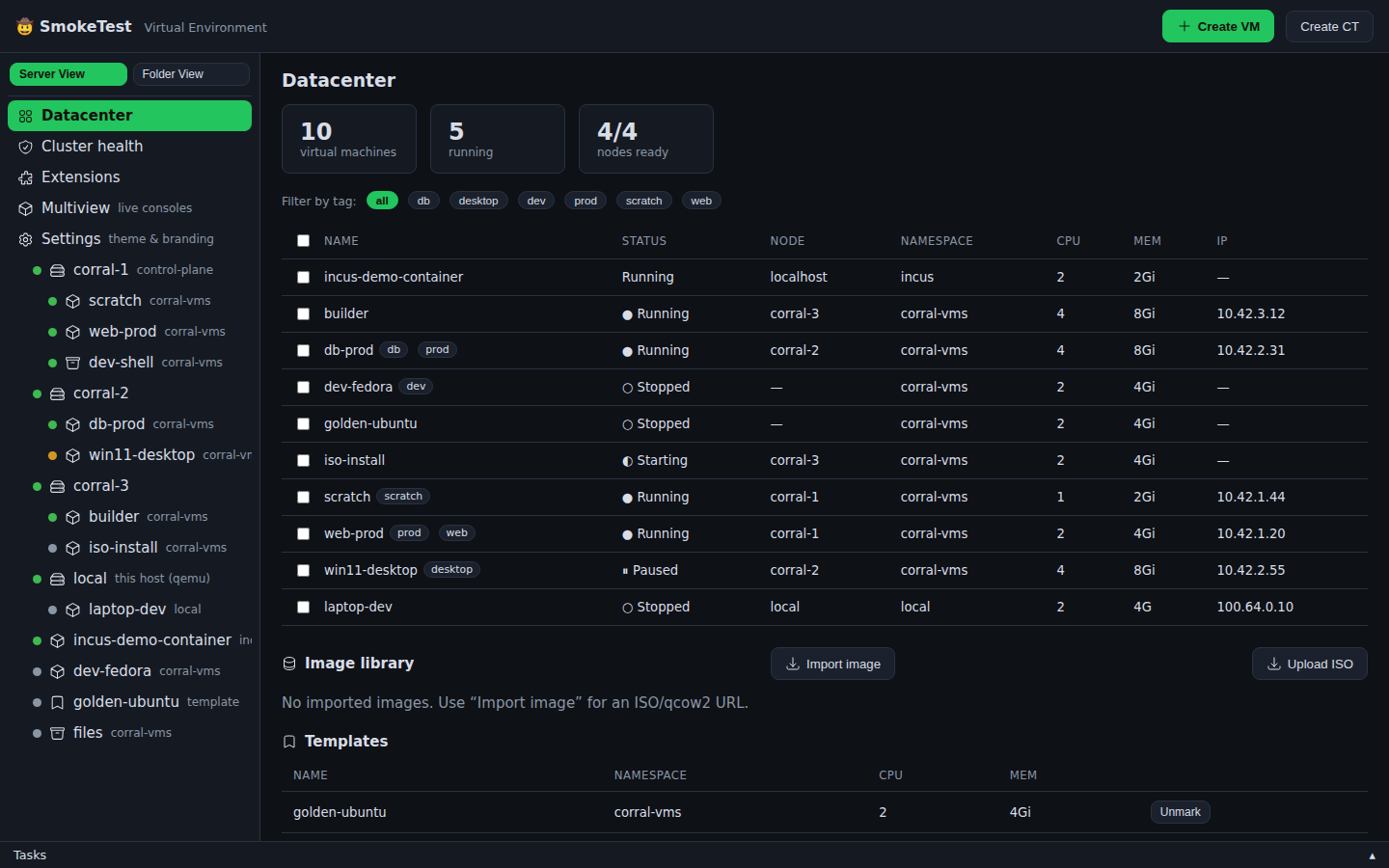
<p>Corral now treats all of them as one fleet.</p>
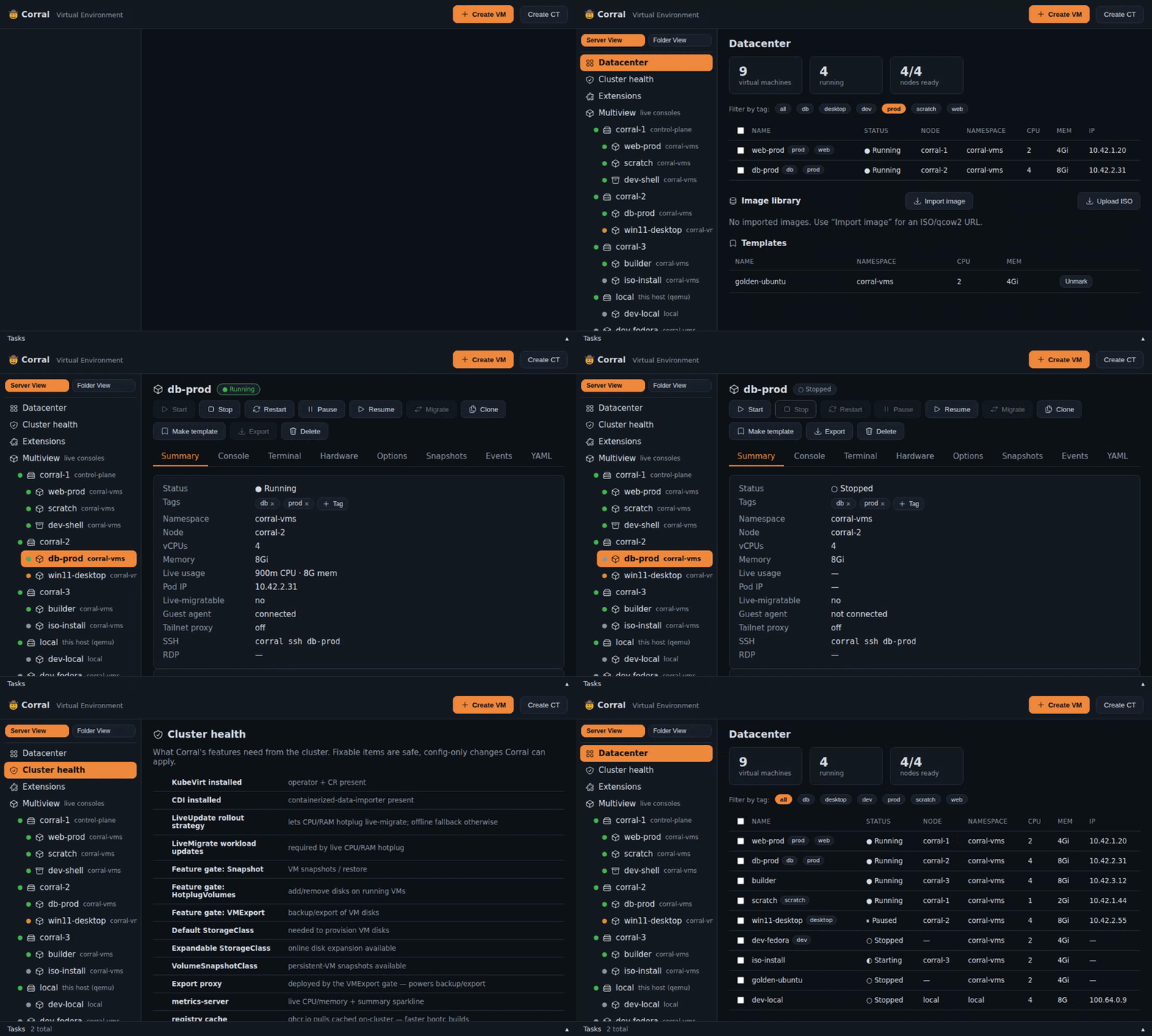
<p><img decoding="async" loading="lazy" alt="Corral&amp;#39;s unified web fleet" src="https://tunaos.org/assets/images/web-fleet-3585e0deb3a3b8207a6afff3eedb5b25.png" width="1440" height="900" class="img_ev3q"></p>
<h2 class="anchor anchorTargetStickyNavbar_Vzrq" id="a-context-is-a-destination-not-a-global-side-effect">A context is a destination, not a global side effect<a href="https://tunaos.org/blog/corral-one-fleet-many-hypervisors#a-context-is-a-destination-not-a-global-side-effect" class="hash-link" aria-label="Direct link to A context is a destination, not a global side effect" title="Direct link to A context is a destination, not a global side effect" translate="no">​</a></h2>
<p>The model is deliberately close to <code>kubectx</code>, but it does not mutate
<code>kubectl</code>, Incus, or libvirt's global configuration:</p>
<div class="language-bash codeBlockContainer_Ckt0 theme-code-block" style="--prism-color:#393A34;--prism-background-color:#f6f8fa"><div class="codeBlockContent_QJqH"><pre tabindex="0" class="prism-code language-bash codeBlock_bY9V thin-scrollbar" style="color:#393A34;background-color:#f6f8fa"><code class="codeBlockLines_e6Vv"><div class="token-line" style="color:#393A34"><span class="token plain">corral context add laptop --backend qemu</span><br></div><div class="token-line" style="color:#393A34"><span class="token plain">corral context add homelab --backend kubevirt --context homelab-admin</span><br></div><div class="token-line" style="color:#393A34"><span class="token plain">corral context add lab-incus --backend incus --context lab</span><br></div><div class="token-line" style="color:#393A34"><span class="token plain">corral context add big-iron --backend libvirt \</span><br></div><div class="token-line" style="color:#393A34"><span class="token plain">  --context qemu+ssh://admin@hypervisor/system</span><br></div><div class="token-line" style="color:#393A34"><span class="token plain" style="display:inline-block"></span><br></div><div class="token-line" style="color:#393A34"><span class="token plain">corral context use homelab</span><br></div><div class="token-line" style="color:#393A34"><span class="token plain">corral list</span><br></div></code></pre></div></div>
<p>The selected context is the default destination for an unqualified create. It
does not make the other machines disappear. <code>corral list</code>, the TUI, and the
web dashboard continue to show the full fleet. Scripts can stay unambiguous with
<code>--backend</code> and <code>--context</code>.</p>
<p>Incus and libvirt authentication also remain boring, which is a feature.
Corral uses the trust and credentials of an existing Incus remote. A libvirt
<code>qemu+ssh</code> URI uses OpenSSH, including your agent, keys, host verification, and
SSH config. There is no second password database to synchronize.</p>
<h2 class="anchor anchorTargetStickyNavbar_Vzrq" id="the-tui-became-a-command-deck">The TUI became a command deck<a href="https://tunaos.org/blog/corral-one-fleet-many-hypervisors#the-tui-became-a-command-deck" class="hash-link" aria-label="Direct link to The TUI became a command deck" title="Direct link to The TUI became a command deck" translate="no">​</a></h2>
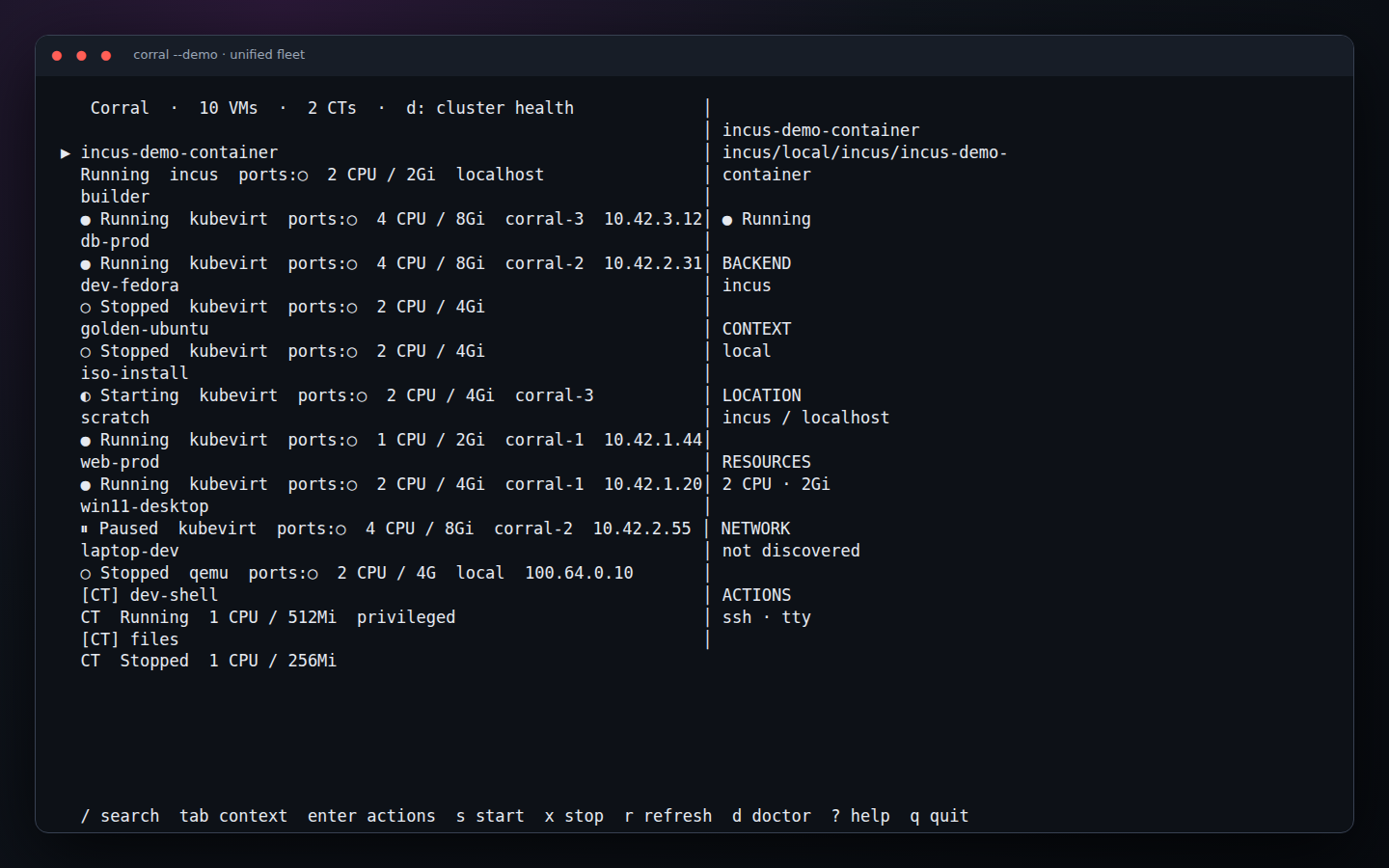
<p><code>corral</code> with no arguments opens the terminal interface. It can fuzzy-search every
canonical identity, cycle contexts with Tab, show backend capabilities, and
run scoped Doctor checks. Unsupported actions do not tempt you and then fail;
they are absent from that instance's action list.</p>
<p><img decoding="async" loading="lazy" alt="Corral&amp;#39;s multi-context TUI" src="https://tunaos.org/assets/images/tui-fleet-c40a8c1d5f2dfdf74820a5e5e8b72249.png" width="1440" height="900" class="img_ev3q"></p>
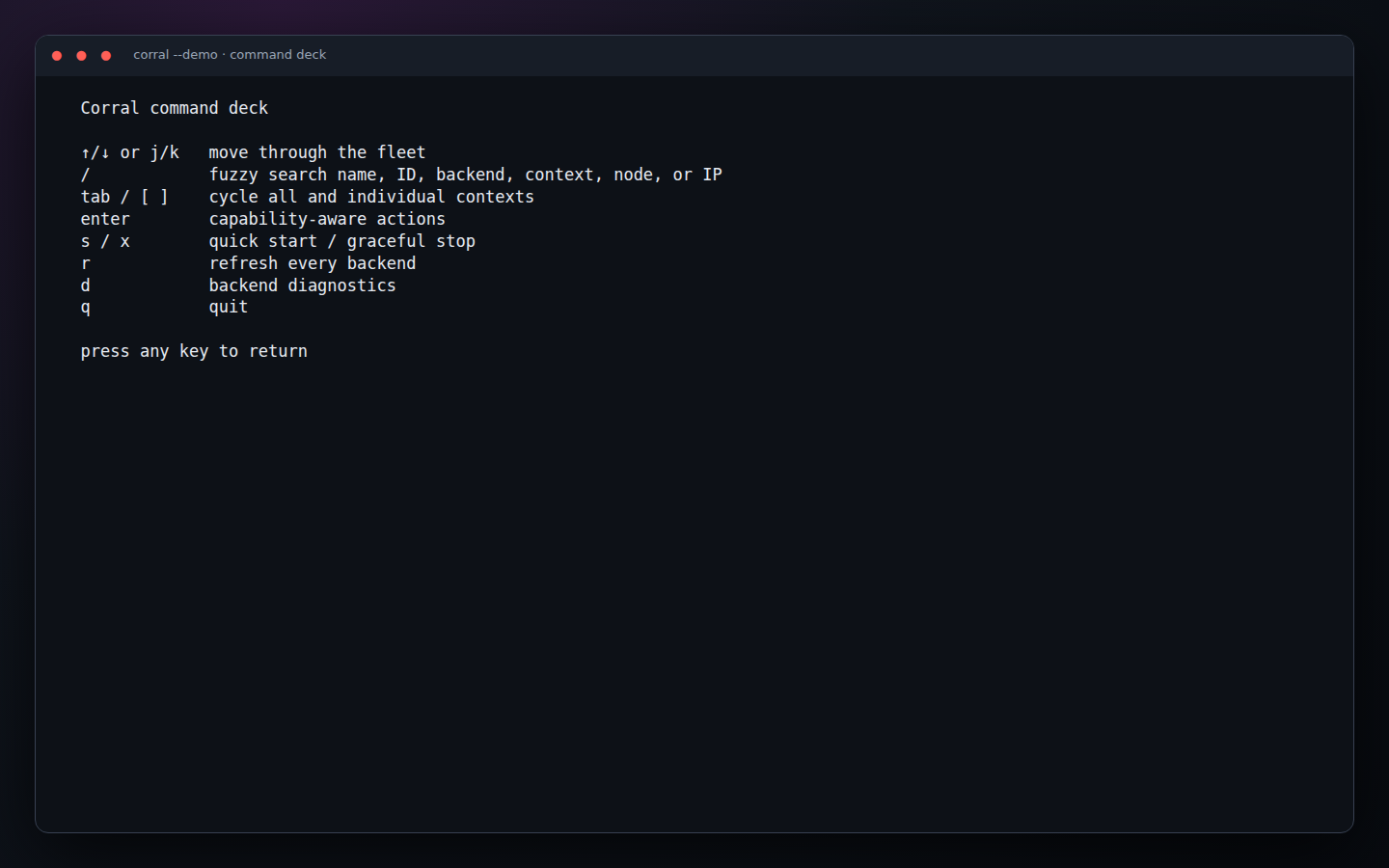
<p>It is the interface I want while living in a terminal: <code>s</code> starts, <code>x</code> stops,
Enter opens the full action list, and <code>?</code> shows the command deck.</p>
<p><img decoding="async" loading="lazy" alt="The TUI command deck" src="https://tunaos.org/assets/images/tui-help-d3af4c86d4695ec3eafd924d63caa4c3.png" width="1440" height="900" class="img_ev3q"></p>
<h2 class="anchor anchorTargetStickyNavbar_Vzrq" id="the-browser-is-the-same-fleet">The browser is the same fleet<a href="https://tunaos.org/blog/corral-one-fleet-many-hypervisors#the-browser-is-the-same-fleet" class="hash-link" aria-label="Direct link to The browser is the same fleet" title="Direct link to The browser is the same fleet" translate="no">​</a></h2>
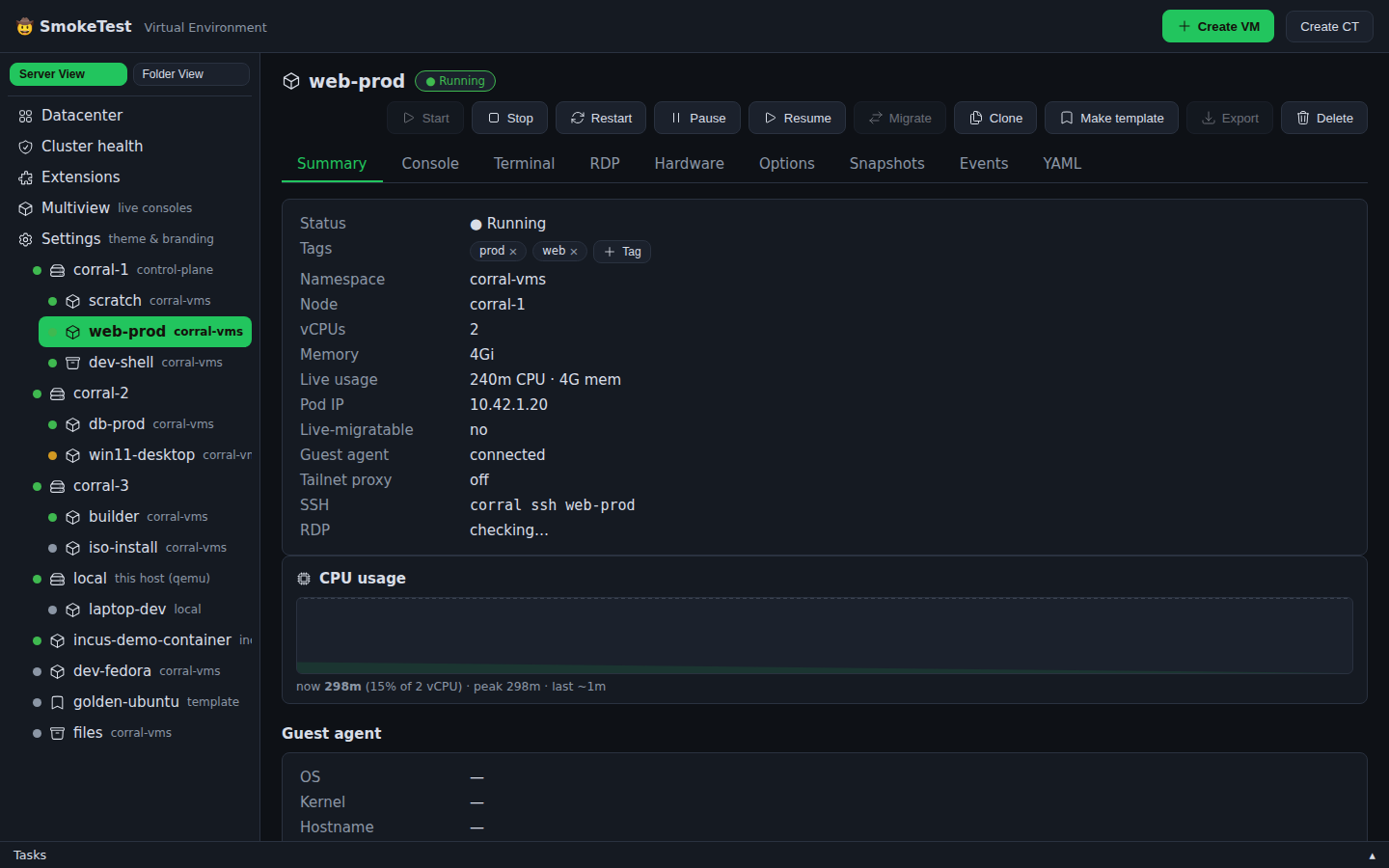
<p><code>corral web</code> is not a separate management product. It reads the same contexts,
registry, plugins, and peers as the CLI and TUI. The dashboard has bulk actions,
tag filters, create flows, health checks, extensions, live consoles, and the
backend-specific controls that each VM supports.</p>
<p><img decoding="async" loading="lazy" alt="Corral&amp;#39;s VM summary" src="https://tunaos.org/assets/images/web-vm-summary-2c448572784aeb234b83b041a1710cf4.png" width="1440" height="900" class="img_ev3q"></p>
<p>A local Corral can also federate an in-cluster one:</p>
<div class="language-bash codeBlockContainer_Ckt0 theme-code-block" style="--prism-color:#393A34;--prism-background-color:#f6f8fa"><div class="codeBlockContent_QJqH"><pre tabindex="0" class="prism-code language-bash codeBlock_bY9V thin-scrollbar" style="color:#393A34;background-color:#f6f8fa"><code class="codeBlockLines_e6Vv"><div class="token-line" style="color:#393A34"><span class="token plain">corral peer add cluster https://corral.cluster.example --token "$TOKEN"</span><br></div></code></pre></div></div>
<p>Guest access is direct-first. If the laptop can reach a VM over Tailscale, an
ordinary ingress, or another private route, traffic does not hairpin through
two Corral servers. The Corral-to-Corral relay is the fallback for the awkward
networks where direct access is impossible. That applies to browser consoles
and CLI operations such as <code>corral ssh</code>.</p>
<h2 class="anchor anchorTargetStickyNavbar_Vzrq" id="four-backends-tested-together">Four backends, tested together<a href="https://tunaos.org/blog/corral-one-fleet-many-hypervisors#four-backends-tested-together" class="hash-link" aria-label="Direct link to Four backends, tested together" title="Direct link to Four backends, tested together" translate="no">​</a></h2>
<p>The built-in backends are now QEMU, KubeVirt, Incus, and libvirt. CI runs a
real triple-backend scenario with QEMU, an Incus VM, and a libvirt domain,
then checks both CLI aggregation and web inventory. KubeVirt has its own kind
cluster browser/API suite.</p>
<p>The interfaces have a no-infrastructure demo too:</p>
<div class="language-bash codeBlockContainer_Ckt0 theme-code-block" style="--prism-color:#393A34;--prism-background-color:#f6f8fa"><div class="codeBlockContent_QJqH"><pre tabindex="0" class="prism-code language-bash codeBlock_bY9V thin-scrollbar" style="color:#393A34;background-color:#f6f8fa"><code class="codeBlockLines_e6Vv"><div class="token-line" style="color:#393A34"><span class="token plain">corral --demo</span><br></div><div class="token-line" style="color:#393A34"><span class="token plain">corral web --demo</span><br></div></code></pre></div></div>
<p><code>scripts/capture-docs.mjs</code> makes the screenshots in this post from those real
demo surfaces. Chromium drives the dashboard and <code>tmux</code> drives the
Bubble Tea application. Documentation images are now refreshable test output,
not a collection of mystery PNGs from somebody's laptop.</p>
<p>Start with the <a class="" href="https://tunaos.org/docs/corral/interfaces">Corral walkthrough</a>, then read the
<a class="" href="https://tunaos.org/docs/corral/contexts">contexts and authentication guide</a> or the complete
<a class="" href="https://tunaos.org/docs/corral/command-reference">command guide</a>.</p>]]></content>
        <author>
            <name>James Reilly</name>
            <uri>https://github.com/hanthor</uri>
        </author>
        <category label="corral" term="corral"/>
        <category label="kubevirt" term="kubevirt"/>
        <category label="qemu" term="qemu"/>
        <category label="incus" term="incus"/>
        <category label="libvirt" term="libvirt"/>
        <category label="virtualization" term="virtualization"/>
    </entry>
    <entry>
        <title type="html"><![CDATA[Corral v0.1: a portable Proxmox for people who already have a cluster (or just a laptop)]]></title>
        <id>https://tunaos.org/blog/corral-portable-proxmox</id>
        <link href="https://tunaos.org/blog/corral-portable-proxmox"/>
        <updated>2026-07-19T00:00:00.000Z</updated>
        <summary type="html"><![CDATA[I love Proxmox. I have run it for years. But Proxmox is a distribution. It]]></summary>
        <content type="html"><![CDATA[<p>I love Proxmox. I have run it for years. But Proxmox is a <em>distribution</em>. It
owns the full machine, and Debian holds it tight. If your infrastructure has
moved to Kubernetes, Proxmox becomes a second world. You must maintain it next
to the first one.</p>
<p><a href="https://github.com/tuna-os/corral" target="_blank" rel="noopener noreferrer" class="">Corral</a> is my answer to a question I could
not put down. The Proxmox experience has a datacenter tree, a create wizard,
consoles that open with one click, and VMs beside containers. What if all of it
were one static binary? You would point that binary at the infrastructure you
have.</p>
<p><img decoding="async" loading="lazy" src="https://raw.githubusercontent.com/tuna-os/corral/main/docs/screenshots/demo.gif" alt="Corral demo tour" class="img_ev3q"></p>
<p>The short version:</p>
<ul>
<li class=""><strong>Got a Kubernetes cluster?</strong> Corral drives KubeVirt through <code>kubectl</code> and
<code>virtctl</code> — no operator to install, no agent, no CRDs of its own.</li>
<li class=""><strong>Only a laptop?</strong> The same commands run VMs on local QEMU/KVM under
systemd. From this week, the same dashboard shows them under a "local" node.</li>
<li class=""><strong>Got Tailscale?</strong> Every VM lands on your tailnet automatically — SSH from
your phone, VNC from the couch.</li>
</ul>
<p>One binary. <code>create</code> / <code>start</code> / <code>ssh</code> / <code>viewer</code> / <code>clone</code> / <code>delete</code> work
identically on both backends, and Corral remembers which VM lives where.
There is a TUI for quick jobs, and a Proxmox-style web dashboard for
everything else. There is also a compatibility layer for the Proxmox API, if
your Terraform provider needs one.</p>
<p>And to be clear about what "one binary" means: the CLI, the TUI, <em>and</em> the
web UI are all in it. <code>brew install tuna-os/tap/corral-vm</code> and you have the
whole product — there's no separate web package or frontend build to deploy.</p>
<h2 class="anchor anchorTargetStickyNavbar_Vzrq" id="try-it-in-30-seconds-literally-no-cluster">Try it in 30 seconds, literally no cluster<a href="https://tunaos.org/blog/corral-portable-proxmox#try-it-in-30-seconds-literally-no-cluster" class="hash-link" aria-label="Direct link to Try it in 30 seconds, literally no cluster" title="Direct link to Try it in 30 seconds, literally no cluster" translate="no">​</a></h2>
<div class="language-bash codeBlockContainer_Ckt0 theme-code-block" style="--prism-color:#393A34;--prism-background-color:#f6f8fa"><div class="codeBlockContent_QJqH"><pre tabindex="0" class="prism-code language-bash codeBlock_bY9V thin-scrollbar" style="color:#393A34;background-color:#f6f8fa"><code class="codeBlockLines_e6Vv"><div class="token-line" style="color:#393A34"><span class="token plain">curl -fsSL https://raw.githubusercontent.com/tuna-os/corral/main/scripts/install.sh | sh</span><br></div><div class="token-line" style="color:#393A34"><span class="token plain">corral --demo        # the TUI</span><br></div><div class="token-line" style="color:#393A34"><span class="token plain">corral web --demo    # the dashboard, on Proxmox's port naturally (8006)</span><br></div></code></pre></div></div>
<p><code>--demo</code> boots a fake cluster in memory, <em>inside</em> the binary. It has three
nodes and eight VMs. Those VMs show each state you meet in real life. Some run and some do not. One shows a pause, one shows a part-installed system,
and one shows a Windows desktop at a pause. One more is an ephemeral scratch VM whose TTL
decreases.</p>
<p>The demo cluster also has two containers and live CPU metrics.</p>
<p>This is not a mockup. The real CLI, the real TUI, and the real web UI run
their own code against it, and the state is live. Stop a VM in the dashboard,
and the TUI agrees.</p>
<p>I built it to improve the interfaces without a cluster, and it became the best
introduction to Corral that we have. It's also how CI drives
the frontend now — a headless browser clicks through the real dashboard
against <code>--demo</code> on every change.</p>
<h2 class="anchor anchorTargetStickyNavbar_Vzrq" id="the-part-i-care-most-about-your-os-is-a-container-image">The part I care most about: your OS is a container image<a href="https://tunaos.org/blog/corral-portable-proxmox#the-part-i-care-most-about-your-os-is-a-container-image" class="hash-link" aria-label="Direct link to The part I care most about: your OS is a container image" title="Direct link to The part I care most about: your OS is a container image" translate="no">​</a></h2>
<p>This is the TunaOS connection. Point Corral at a <em>bootable container image</em>:</p>
<div class="language-bash codeBlockContainer_Ckt0 theme-code-block" style="--prism-color:#393A34;--prism-background-color:#f6f8fa"><div class="codeBlockContent_QJqH"><pre tabindex="0" class="prism-code language-bash codeBlock_bY9V thin-scrollbar" style="color:#393A34;background-color:#f6f8fa"><code class="codeBlockLines_e6Vv"><div class="token-line" style="color:#393A34"><span class="token plain">corral create dev --bootc ghcr.io/tuna-os/yellowfin:gnome --wait-ssh</span><br></div></code></pre></div></div>
<p>It runs <code>bootc install to-disk</code> in a builder VM on the cluster, then boots
the result as a first-class VM. Your OS lives in a registry;
<code>corral bootc upgrade</code> moves the VM to the next build. Every TunaOS image —
and every Universal Blue image, and anything else bootc-bootable — becomes a
VM you can summon with one command. Proxmox structurally can't do that.</p>
<h2 class="anchor anchorTargetStickyNavbar_Vzrq" id="containers-get-the-proxmox-treatment-too">Containers get the Proxmox treatment too<a href="https://tunaos.org/blog/corral-portable-proxmox#containers-get-the-proxmox-treatment-too" class="hash-link" aria-label="Direct link to Containers get the Proxmox treatment too" title="Direct link to Containers get the Proxmox treatment too" translate="no">​</a></h2>
<p><code>corral ct create</code> makes a "pet pod" — a plain Kubernetes pod with a
persistent volume and an init process, presented like a Proxmox CT. In
privileged mode it seeds a full root filesystem onto the volume,
distrobox-style, so <code>apt install</code> survives a restart. There's even
<code>corral ct create myproj --devcontainer ./myproj</code> if your project already
has a devcontainer.json.</p>
<h2 class="anchor anchorTargetStickyNavbar_Vzrq" id="honest-state-of-things">Honest state of things<a href="https://tunaos.org/blog/corral-portable-proxmox#honest-state-of-things" class="hash-link" aria-label="Direct link to Honest state of things" title="Direct link to Honest state of things" translate="no">​</a></h2>
<p>v0.1.x, five weeks old. The KubeVirt backend is the most exercised path;
local QEMU in the web UI landed this week (lifecycle + info; consoles still
route through the CLI). Windows VMs, GPU passthrough, and scheduled
snapshots and backups are plugins. They are not all equally mature.</p>
<p>Do you run VMs on Kubernetes, and miss the way Proxmox <em>feels</em>? Or do you run
Proxmox, and want one binary in place of an operating system? Give
<code>corral --demo</code> thirty seconds. That is the pitch.</p>
<p>Corral is Apache-2.0 at
<a href="https://github.com/tuna-os/corral" target="_blank" rel="noopener noreferrer" class="">github.com/tuna-os/corral</a>. Stars are
welcome: they are the gate to homebrew-core.</p>]]></content>
        <author>
            <name>James Reilly</name>
            <uri>https://github.com/hanthor</uri>
        </author>
        <category label="corral" term="corral"/>
        <category label="kubevirt" term="kubevirt"/>
        <category label="qemu" term="qemu"/>
        <category label="virtualization" term="virtualization"/>
        <category label="announcement" term="announcement"/>
    </entry>
    <entry>
        <title type="html"><![CDATA[Modern Enterprise Linux Desktops with TunaOS]]></title>
        <id>https://tunaos.org/blog/modern-enterprise-linux-desktops-with-tunaos</id>
        <link href="https://tunaos.org/blog/modern-enterprise-linux-desktops-with-tunaos"/>
        <updated>2026-07-19T00:00:00.000Z</updated>
        <summary type="html"><![CDATA[Enterprise Linux has a problem with the desktop. RHEL, AlmaLinux and CentOS]]></summary>
        <content type="html"><![CDATA[<p>Enterprise Linux has a problem with the desktop. RHEL, AlmaLinux and CentOS
Stream are made for servers. They are strong, they have a long life, and they
are stable to the point of tedium. For a fleet of production hosts, this is
correct. But it is not correct for the machine that a developer or an
administrator uses each day.</p>
<p>Thus most EL sites use Fedora or Ubuntu on the desktop, and something fully
different in the datacenter. The result is two package ecosystems and two
update rates. It is also two sets of tickets that ask why the same operation
is different on the two systems.</p>
<p>TunaOS closes this gap. It gives you true desktop environments as <code>bootc</code>
images. They are built directly on the Enterprise Linux base that your
servers use now.</p>
<h2 class="anchor anchorTargetStickyNavbar_Vzrq" id="the-same-base-with-a-true-desktop">The same base, with a true desktop<a href="https://tunaos.org/blog/modern-enterprise-linux-desktops-with-tunaos#the-same-base-with-a-true-desktop" class="hash-link" aria-label="Direct link to The same base, with a true desktop" title="Direct link to The same base, with a true desktop" translate="no">​</a></h2>
<p><strong>Albacore</strong> is the primary variant. Its base is AlmaLinux 10, which follows
RHEL 10 rebuild for rebuild.</p>
<p>On that base you have a true choice of desktop: GNOME, KDE Plasma, COSMIC or
Niri. Each desktop is its own <code>bootc</code> image: <code>ghcr.io/tuna-os/albacore:gnome</code>,
<code>:kde</code>, <code>:cosmic</code> and <code>:niri</code>. There are also <code>-hwe</code> and <code>-nvidia</code> images for
more recent hardware.</p>
<p>Other variants follow the remainder of the EL family. <strong>Yellowfin</strong> uses
AlmaLinux Kitten 10, the preview of the next major AlmaLinux. <strong>Skipjack</strong>
uses CentOS Stream 10. <strong>Redfin</strong> uses RHEL 10 itself, and its license lets you
build it only locally.</p>
<p>This is not a fork, and it is not a compatibility layer. It is the true
AlmaLinux and RHEL package set, with the same lifecycle. A desktop goes on
top of it. The pipeline that makes the image is the usual <code>bootc</code> pipeline.</p>
<h2 class="anchor anchorTargetStickyNavbar_Vzrq" id="what-bootc-gives-you">What bootc gives you<a href="https://tunaos.org/blog/modern-enterprise-linux-desktops-with-tunaos#what-bootc-gives-you" class="hash-link" aria-label="Direct link to What bootc gives you" title="Direct link to What bootc gives you" translate="no">​</a></h2>
<p>The image <em>is</em> the update. <code>bootc status</code> shows the exact container reference
that you booted. <code>bootc upgrade</code> gets the next image, prepares it, and reboots
into it. If there is a fault, it returns to the previous deployment.</p>
<p><code>rpm-ostree</code> on Fedora Silverblue did the same. But here the artifact is an
ordinary OCI image. You build it, scan it, and push it with the same registry
and the same CI tools as each other product of your team.</p>
<p>For an EL site, this is the important part. Your desktop images can use the
same pipeline rules as your server images. Hold a known-good digest for a
training laboratory. Push a new tag to send a security fix to all machines.
Compare two deployments to see the exact changes.</p>
<p>For none of this do you need a second toolchain. It is the toolchain that you
already use in production.</p>
<h2 class="anchor anchorTargetStickyNavbar_Vzrq" id="try-it">Try it<a href="https://tunaos.org/blog/modern-enterprise-linux-desktops-with-tunaos#try-it" class="hash-link" aria-label="Direct link to Try it" title="Direct link to Try it" translate="no">​</a></h2>
<p>Downloads are live at <a href="https://tunaos.org/download" target="_blank" rel="noopener noreferrer" class="">tunaos.org/download</a>, or pull a variant directly:</p>
<div class="language-bash codeBlockContainer_Ckt0 theme-code-block" style="--prism-color:#393A34;--prism-background-color:#f6f8fa"><div class="codeBlockContent_QJqH"><pre tabindex="0" class="prism-code language-bash codeBlock_bY9V thin-scrollbar" style="color:#393A34;background-color:#f6f8fa"><code class="codeBlockLines_e6Vv"><div class="token-line" style="color:#393A34"><span class="token plain">podman pull ghcr.io/tuna-os/albacore:gnome</span><br></div></code></pre></div></div>
<p>The <a class="" href="https://tunaos.org/docs/tunaos">variant table</a> gives the full set of bases, desktops and
hardware tags. The <a class="" href="https://tunaos.org/docs/tunaos/bootc-usage">bootc usage guide</a> shows the
daily <code>bootc</code> commands.</p>
<p>Tell us if something does not operate, or if you have trouble with the
download page. Write to us in <a href="https://github.com/tuna-os/tunaOS/discussions" target="_blank" rel="noopener noreferrer" class="">Discussions</a>. That is what
it is for.</p>]]></content>
        <author>
            <name>James Reilly</name>
            <uri>https://github.com/hanthor</uri>
        </author>
        <category label="tunaos" term="tunaos"/>
        <category label="almalinux" term="almalinux"/>
        <category label="bootc" term="bootc"/>
        <category label="enterprise" term="enterprise"/>
        <category label="announcement" term="announcement"/>
    </entry>
    <entry>
        <title type="html"><![CDATA[Oracle, Not Port: A Rust Office Suite That Proves Its Parity on Every Commit]]></title>
        <id>https://tunaos.org/blog/oracle-not-port</id>
        <link href="https://tunaos.org/blog/oracle-not-port"/>
        <updated>2026-07-18T00:00:00.000Z</updated>
        <summary type="html"><![CDATA[We write a GNOME-native office suite in Rust. It has three applications:]]></summary>
        <content type="html"><![CDATA[<p>We write a GNOME-native office suite in Rust. It has three applications:
<strong>Letters</strong> for text, <strong>Tables</strong> for spreadsheets, and <strong>Decks</strong> for
presentations. They use GTK4 and libadwaita, and we release them as Flatpaks.</p>
<p>This post is about one part that other projects can copy. It shows how a small
codebase competes with thirty years of office-suite work, and does not port
one line of it.</p>
<h2 class="anchor anchorTargetStickyNavbar_Vzrq" id="the-problem-with-compatible-with-word">The problem with "compatible with Word"<a href="https://tunaos.org/blog/oracle-not-port#the-problem-with-compatible-with-word" class="hash-link" aria-label="Direct link to The problem with &quot;compatible with Word&quot;" title="Direct link to The problem with &quot;compatible with Word&quot;" translate="no">​</a></h2>
<p>Each alternative office suite makes a claim about compatibility. Almost none of
them can say what the claim means. LibreOffice earned its claim across three
decades. It has a large set of test documents, and a long history of bug
reports.</p>
<p>We had eleven thousand lines of Rust, and a test suite. On day one we found
that the test suite had never run. The badge for CI stayed green. <code>pytest || true</code> hid one fact: the runner had no pytest.</p>
<p>Under that badge, the spreadsheet application and the presentation application
could not start at all. The save shortcut in the word processor did nothing.
Each save discarded the speaker notes.</p>
<p>So this is first a story about honest CI. But red tests tell you only what you
already thought to test. The more interesting question is different: how do
you test against the files that people have?</p>
<h2 class="anchor anchorTargetStickyNavbar_Vzrq" id="let-libreoffice-grade-the-homework">Let LibreOffice grade the homework<a href="https://tunaos.org/blog/oracle-not-port#let-libreoffice-grade-the-homework" class="hash-link" aria-label="Direct link to Let LibreOffice grade the homework" title="Direct link to Let LibreOffice grade the homework" translate="no">​</a></h2>
<p>Our answer: <strong>run LibreOffice headless in CI as an oracle. Do not port its
code, its tests, or its data.</strong></p>
<p>There are three mechanisms. Each one has a ratchet: CI holds a count of the
tests that pass, and refuses to let the count fall. To raise the count is the
definition of progress.</p>
<ol>
<li class="">
<p><strong>Corpora that LibreOffice writes.</strong> We write the test scenarios in HTML.
At test time, headless Writer makes them into <code>.docx</code> files. Our engine must
then extract the same text and the same styles from the file that
LibreOffice wrote. We vendor nothing, and the corpus regenerates on each
run. Letters has 109 scenarios and passes 109 of them.</p>
<p>Decks has no cheap input format to author from, so its scenarios go
<em>through</em> the oracle instead. We write a <code>.pptx</code> file. Impress imports it,
then exports it again in its own grammar. Our reader then reads the version
that LibreOffice made. Decks passes 9 of 9, which includes styled runs and
speaker notes.</p>
</li>
<li class="">
<p><strong>Round-trip oracles.</strong> Writer, Calc, or Impress must open each file that
our engines write. The content must survive the conversion without a
change. Both directions gate each commit.</p>
</li>
<li class="">
<p><strong>Vendored permissive corpora.</strong> The 652 examples in the CommonMark
specification test the document model for round-trip idempotence, and 594
pass. Another 107 table-driven cases come from ODF OpenFormula, and they
measure the spreadsheet engine. All 107 pass. Nine of them started red.
Each one was a clean <code>#NAME?</code>, and IronCalc main had the fix already. The
ratchet held the gap open until upstream closed it.</p>
</li>
</ol>
<p>The corpus pays for itself continuously. It found table text that our DOCX
reader dropped in silence. It found speaker notes that had never survived one
save. Best of all, it found a fault that we added ourselves while we added
support for images. The ratchet reported it twenty minutes after we wrote it.</p>
<h2 class="anchor anchorTargetStickyNavbar_Vzrq" id="a-document-engine-is-smaller-than-you-think">A document engine is smaller than you think<a href="https://tunaos.org/blog/oracle-not-port#a-document-engine-is-smaller-than-you-think" class="hash-link" aria-label="Direct link to A document engine is smaller than you think" title="Direct link to A document engine is smaller than you think" translate="no">​</a></h2>
<p>People think the document engine is the difficult part of a word processor. It
came to about 2,500 lines of Rust. The large costs are elsewhere, and
Rust's ecosystem or the platform pays them for us:</p>
<ul>
<li class=""><strong>Pango does the text layout.</strong> The platform breaks the lines, shapes the
glyphs, and handles bidirectional text, as it does for each GNOME
application. LibreOffice wrote its own because it is older than any usable
system text stack. We refuse to.</li>
<li class=""><strong>A library reads and writes the formats.</strong> The OOXML package and its XML live
in <a href="https://github.com/tensorbee/rdocx" target="_blank" rel="noopener noreferrer" class="">rdocx</a>. We contributed the read
getters, and the write support for hyperlinks and images that our fidelity
tests needed. <a href="https://github.com/ironcalc/ironcalc" target="_blank" rel="noopener noreferrer" class="">IronCalc</a> evaluates the
spreadsheets, pulldown-cmark reads the Markdown, and Typst-as-a-library
exports the PDFs.</li>
<li class=""><strong>What remains is the engine.</strong> It is a model of paragraphs that hold styled
runs, with invariants the code enforces. It addresses offsets in
deliberately the same way as GtkTextBuffer, which makes the bridge to the
widget a thin adapter. The machinery above measures how honest
the format converters are. Decks and Letters share the model: the text boxes
in Decks carry the same <code>Run</code> and <code>RunStyle</code> types as Letters.</li>
</ul>
<p>Some work stays out of scope until it earns an architecture decision: fields,
macros, mail merge, tracked changes, and frames that flow text. Our target is
the documents that people make. You can read the fidelity off a scoreboard.
You do not have to trust us.</p>
<h2 class="anchor anchorTargetStickyNavbar_Vzrq" id="the-scoreboard-today">The scoreboard, today<a href="https://tunaos.org/blog/oracle-not-port#the-scoreboard-today" class="hash-link" aria-label="Direct link to The scoreboard, today" title="Direct link to The scoreboard, today" translate="no">​</a></h2>
<table><thead><tr><th>Measure</th><th>Value</th></tr></thead><tbody><tr><td>LibreOffice-authored parity — Letters</td><td>109/109</td></tr><tr><td>LibreOffice-authored parity — Decks</td><td>9/9</td></tr><tr><td>OpenFormula conformance — Tables</td><td>107/107</td></tr><tr><td>CommonMark round-trip idempotence</td><td>594/652</td></tr><tr><td>DOCX round-trip fidelity suite</td><td>15/15</td></tr><tr><td>soffice oracles (Writer/Calc/Impress, both directions)</td><td>green, gating</td></tr><tr><td>Workspace tests</td><td>150, zero failures</td></tr></tbody></table>
<p>Each number prints into the CI job summary on each push. None of them can go
down.</p>
<h2 class="anchor anchorTargetStickyNavbar_Vzrq" id="steal-this">Steal this<a href="https://tunaos.org/blog/oracle-not-port#steal-this" class="hash-link" aria-label="Direct link to Steal this" title="Direct link to Steal this" translate="no">​</a></h2>
<p>The pattern moves to any project that reads or writes a file format that
somebody else defined. Find the reference implementation. Run it headless in
CI. Make it write your corpus, and put a ratchet on the count of tests that
pass. It costs a few hundred lines of test harness, and it turns "we aim to be
compatible" into a number that moves.</p>
<p><em>Code: <a href="https://github.com/tuna-os/gtk-office-suite" target="_blank" rel="noopener noreferrer" class="">tuna-os/gtk-office-suite</a>,
GPL-3.0-or-later. The spreadsheet core is on crates.io as
<a href="https://crates.io/crates/tables-core" target="_blank" rel="noopener noreferrer" class="">tables-core</a>, together with
<a href="https://crates.io/crates/suite-common-core" target="_blank" rel="noopener noreferrer" class="">suite-common-core</a> and
<a href="https://crates.io/crates/suite-export" target="_blank" rel="noopener noreferrer" class="">suite-export</a>. The document model
follows as <code>letters-core</code> when upstream accepts its additions to rdocx
(<a href="https://github.com/tensorbee/rdocx/pull/6" target="_blank" rel="noopener noreferrer" class="">tensorbee/rdocx#6</a>).</em></p>]]></content>
        <author>
            <name>James Reilly</name>
            <uri>https://github.com/hanthor</uri>
        </author>
        <category label="office-suite" term="office-suite"/>
        <category label="rust" term="rust"/>
        <category label="gtk" term="gtk"/>
        <category label="testing" term="testing"/>
        <category label="letters" term="letters"/>
        <category label="tables" term="tables"/>
        <category label="decks" term="decks"/>
    </entry>
    <entry>
        <title type="html"><![CDATA[Remora: The Fish That Rides Your Image]]></title>
        <id>https://tunaos.org/blog/remora-local-layering</id>
        <link href="https://tunaos.org/blog/remora-local-layering"/>
        <updated>2026-07-11T00:00:00.000Z</updated>
        <summary type="html"><![CDATA[Users of each image-based distribution ask the same question. How do you]]></summary>
        <content type="html"><![CDATA[<p>Users of each image-based distribution ask the same question. How do you
install one package? This is my answer. Its name is remora. It adds local
layers in the container-native way. It operates in the same manner on each
variant that we release, and the base can use dnf, zypper, pacman, apt,
emerge, or apk.</p>
<div class="language-bash codeBlockContainer_Ckt0 theme-code-block" style="--prism-color:#393A34;--prism-background-color:#f6f8fa"><div class="codeBlockContent_QJqH"><pre tabindex="0" class="prism-code language-bash codeBlock_bY9V thin-scrollbar" style="color:#393A34;background-color:#f6f8fa"><code class="codeBlockLines_e6Vv"><div class="token-line" style="color:#393A34"><span class="token plain">sudo remora install htop</span><br></div></code></pre></div></div>
<p>That is the full interface.</p>
<h2 class="anchor anchorTargetStickyNavbar_Vzrq" id="why-the-old-answers-were-not-sufficient">Why the old answers were not sufficient<a href="https://tunaos.org/blog/remora-local-layering#why-the-old-answers-were-not-sufficient" class="hash-link" aria-label="Direct link to Why the old answers were not sufficient" title="Direct link to Why the old answers were not sufficient" translate="no">​</a></h2>
<p>On most image-based systems the answer was <code>rpm-ostree install</code>. That command
adds package layers to the ostree deployment. It operates, but it is slow, it
accepts only RPMs, and it opposes the idea of an image-based system. Your
"image" quietly becomes different from every other person's image, and no
Containerfile records how it got there.</p>
<p>The bootc community had found a better method. I had not seen a tool that
made the method easy. Three sources found the same trick: the Universal Blue
forums, akdev1l's <a href="https://github.com/akdev1l/zerolayer" target="_blank" rel="noopener noreferrer" class="">zerolayer</a>, and
repositories such as <a href="https://github.com/renner0e/server" target="_blank" rel="noopener noreferrer" class="">renner0e/server</a>.
The trick is to operate the image factory yourself, on your own machine.</p>
<p>Keep a Containerfile that derives <code>FROM</code> your base. Build it again on a timer
with <code>Pull=newer</code>. Then use <code>bootc switch</code> to move to the result. Your changes
become a usual image build. You can examine it, make it again, or reverse it.</p>
<p>The pattern is correct. Only its ergonomics were bad, because it told you to
maintain a git repository of build scripts on your server. remora is the same
pattern, but it feels like a package manager.</p>
<h2 class="anchor anchorTargetStickyNavbar_Vzrq" id="what-it-does">What it does<a href="https://tunaos.org/blog/remora-local-layering#what-it-does" class="hash-link" aria-label="Direct link to What it does" title="Direct link to What it does" translate="no">​</a></h2>
<p>A remora is the fish that travels with a larger fish, and that is the name's
origin. This tool travels with the image that your system booted:</p>
<div class="language-text codeBlockContainer_Ckt0 theme-code-block" style="--prism-color:#393A34;--prism-background-color:#f6f8fa"><div class="codeBlockContent_QJqH"><pre tabindex="0" class="prism-code language-text codeBlock_bY9V thin-scrollbar" style="color:#393A34;background-color:#f6f8fa"><code class="codeBlockLines_e6Vv"><div class="token-line" style="color:#393A34"><span class="token plain">/etc/remora/remora.yaml ──► generated Containerfile ──► podman quadlet (Pull=newer)</span><br></div><div class="token-line" style="color:#393A34"><span class="token plain">                                                              │  daily / on demand / via uupd</span><br></div><div class="token-line" style="color:#393A34"><span class="token plain">                                                              ▼</span><br></div><div class="token-line" style="color:#393A34"><span class="token plain">                                                localhost/remora:latest</span><br></div><div class="token-line" style="color:#393A34"><span class="token plain">                                                              │</span><br></div><div class="token-line" style="color:#393A34"><span class="token plain">                                                              ▼</span><br></div><div class="token-line" style="color:#393A34"><span class="token plain">                                     bootc switch --transport=containers-storage</span><br></div></code></pre></div></div>
<p><code>sudo remora init</code> prepares all of it. <code>remora install</code> and <code>remora remove</code>
change a small YAML file, then build the image again. When upstream releases
a new base image, the next build gets it and puts your layers back on top. You
cannot become stuck on an old base, and you cannot lose your changes. Each
change makes a new image, and <code>bootc rollback</code> reverses a change as usual.</p>
<p>Do you need more than packages? You have three methods. Put scripts in
<code>/etc/remora/build_files/</code>. Overlay files with <code>/etc/remora/system_files/</code>.
Use <code>extra_run</code> in the manifest for more repositories and keys.</p>
<p>You can do stranger things too. To remora, a <a href="https://buildstream.build/" target="_blank" rel="noopener noreferrer" class="">BuildStream</a>
<code>bst build</code> step is one more build script. remora does not try to contain your
tools. It gives them a place in the image build.</p>
<h2 class="anchor anchorTargetStickyNavbar_Vzrq" id="one-tool-six-package-managers">One tool, six package managers<a href="https://tunaos.org/blog/remora-local-layering#one-tool-six-package-managers" class="hash-link" aria-label="Direct link to One tool, six package managers" title="Direct link to One tool, six package managers" translate="no">​</a></h2>
<p>We release <a class="" href="https://tunaos.org/blog/13-fishes-in-the-sea">13 variants across each major Linux family</a>.
A tool for Fedora alone was never enough. remora finds the base's package
manager and builds correctly for it. It uses dnf on Yellowfin, zypper on
Sailfin, and pacman on Marlin. It uses apt on Flounder and Grouper, emerge on
Guppy, and apk on Alpine bases.</p>
<p>Each manager has its own cache mount, so builds stay fast. A
<code>bootc container lint</code> gate stops a bad image before your bootloader gets it.</p>
<p>Your <code>remora.yaml</code> does not know which fish carries it, and does not need to.</p>
<h2 class="anchor anchorTargetStickyNavbar_Vzrq" id="dnf-install-now-tells-you-the-truth"><code>dnf install</code> now tells you the truth<a href="https://tunaos.org/blog/remora-local-layering#dnf-install-now-tells-you-the-truth" class="hash-link" aria-label="Direct link to dnf-install-now-tells-you-the-truth" title="Direct link to dnf-install-now-tells-you-the-truth" translate="no">​</a></h2>
<p>This part pleases me most. On an image-based system, <code>dnf install</code> against the
host was always broken. You got an error about a read-only file
system, and the error explained nothing. You then had to find the cause
yourself. Now:</p>
<div class="language-text codeBlockContainer_Ckt0 theme-code-block" style="--prism-color:#393A34;--prism-background-color:#f6f8fa"><div class="codeBlockContent_QJqH"><pre tabindex="0" class="prism-code language-text codeBlock_bY9V thin-scrollbar" style="color:#393A34;background-color:#f6f8fa"><code class="codeBlockLines_e6Vv"><div class="token-line" style="color:#393A34"><span class="token plain">$ sudo dnf install htop</span><br></div><div class="token-line" style="color:#393A34"><span class="token plain">This is a bootc (image-based) system: /usr is read-only, so 'dnf' cannot change packages here.</span><br></div><div class="token-line" style="color:#393A34"><span class="token plain">Package changes are layered onto your image with remora:</span><br></div><div class="token-line" style="color:#393A34"><span class="token plain">  remora install htop</span><br></div><div class="token-line" style="color:#393A34"><span class="token plain">Run that now? [y/N]</span><br></div></code></pre></div></div>
<p><code>sudo remora shims</code> puts these interceptors in <code>/usr/local/bin</code>. You choose
whether to add them, you can remove them fully, and they touch nothing that
they did not make. They catch only the commands that would change something:
<code>dnf search</code>, <code>pacman -Q</code>, and <code>apt show</code> continue as usual. Twenty years of
muscle memory now points you at the correct tool.</p>
<h2 class="anchor anchorTargetStickyNavbar_Vzrq" id="updates-go-through-uupd">Updates go through uupd<a href="https://tunaos.org/blog/remora-local-layering#updates-go-through-uupd" class="hash-link" aria-label="Direct link to Updates go through uupd" title="Direct link to Updates go through uupd" translate="no">​</a></h2>
<p>We already use <a href="https://github.com/ublue-os/uupd" target="_blank" rel="noopener noreferrer" class="">uupd</a> for updates. It knows
the battery state, it does not overload a metered connection, and it obeys
inhibitors. remora does not do that work again. When uupd is on the system,
<code>remora init</code> adds a two-line systemd override. Each uupd run then builds your
local image first and gives the result to uupd's usual process. remora adds no
daemon, no dependency in either direction, and no second schedule for you to
remember.</p>
<h2 class="anchor anchorTargetStickyNavbar_Vzrq" id="try-it">Try it<a href="https://tunaos.org/blog/remora-local-layering#try-it" class="hash-link" aria-label="Direct link to Try it" title="Direct link to Try it" translate="no">​</a></h2>
<p>TunaOS images include it. It is also a static binary for
<a href="https://github.com/tuna-os/remora" target="_blank" rel="noopener noreferrer" class="">other bootc systems</a>:</p>
<div class="language-bash codeBlockContainer_Ckt0 theme-code-block" style="--prism-color:#393A34;--prism-background-color:#f6f8fa"><div class="codeBlockContent_QJqH"><pre tabindex="0" class="prism-code language-bash codeBlock_bY9V thin-scrollbar" style="color:#393A34;background-color:#f6f8fa"><code class="codeBlockLines_e6Vv"><div class="token-line" style="color:#393A34"><span class="token plain">sudo remora init</span><br></div><div class="token-line" style="color:#393A34"><span class="token plain">sudo remora install htop cmatrix</span><br></div><div class="token-line" style="color:#393A34"><span class="token plain">sudo remora enable        # build again automatically</span><br></div><div class="token-line" style="color:#393A34"><span class="token plain">remora status</span><br></div></code></pre></div></div>
<p>The <a class="" href="https://tunaos.org/docs/remora">documentation</a> has more, and the source is at
<a href="https://github.com/tuna-os/remora" target="_blank" rel="noopener noreferrer" class="">tuna-os/remora</a>. This point is worth a
second statement. The pattern of a local image factory comes from the
Universal Blue community, from zerolayer, and from renner0e. I only tried to
make it feel like a package manager, and not like a git repository that you
tend.</p>
<p>The fish rides on. 🐟</p>]]></content>
        <author>
            <name>James Reilly</name>
            <uri>https://github.com/hanthor</uri>
        </author>
        <category label="tools" term="tools"/>
        <category label="bootc" term="bootc"/>
        <category label="layering" term="layering"/>
        <category label="remora" term="remora"/>
    </entry>
    <entry>
        <title type="html"><![CDATA[12 Fishes in the Sea: The TunaOS Variant Landscape]]></title>
        <id>https://tunaos.org/blog/13-fishes-in-the-sea</id>
        <link href="https://tunaos.org/blog/13-fishes-in-the-sea"/>
        <updated>2026-07-07T00:00:00.000Z</updated>
        <summary type="html"><![CDATA[Picking a Linux distro has always felt weirder to me than it should be. Most of them are like 95% the same packages with 5% different defaults, and yet somehow choosing one feels like a permanent decision you're stuck with forever.]]></summary>
        <content type="html"><![CDATA[<p>Picking a Linux distro has always felt weirder to me than it should be. Most of them are like 95% the same packages with 5% different defaults, and yet somehow choosing one feels like a permanent decision you're stuck with forever.</p>
<p>I didn't come up with this idea, to be clear. <a href="https://bedrocklinux.org/" target="_blank" rel="noopener noreferrer" class="">Bedrock Linux</a> was mixing packages from different distros on one system back in 2012. <a href="https://0pointer.net/blog/fitting-everything-together.html" target="_blank" rel="noopener noreferrer" class="">Lennart Poettering</a> wrote the whole blueprint out in his mkosi posts — sysext, confext, repart, UKIs, the works. <a href="https://github.com/carbonOS" target="_blank" rel="noopener noreferrer" class="">CarbonOS</a> took a run at OCI image delivery with btrfs snapshots on Fedora Atomic back in 2021. And <a href="https://blog.jessfraz.com/" target="_blank" rel="noopener noreferrer" class="">Jessie Frazelle</a> was running her whole desktop out of Docker containers in 2015, which honestly should have gotten more attention than it did. Everyone kept poking at the same idea from a different angle.</p>
<p>What actually made it usable were two things. <a href="https://github.com/containers/bootc" target="_blank" rel="noopener noreferrer" class="">bootc</a> — you get an OCI image, you <code>switch</code> to it, it's atomic, and you can roll back if you screwed something up. And <a href="https://projectbluefin.io/" target="_blank" rel="noopener noreferrer" class="">Project Bluefin</a> proved people would actually use this every day, not just as a tech demo. Once I saw that working at scale I started wondering how far you could actually push it.</p>
<p>So that's what TunaOS is, I guess — pushing it. We ship 12 variants right now across 5 package managers and pretty much every major Linux family, and they all end up as the same desktop experience underneath. If you can swap the base OS out from under a desktop and nothing changes, the distro isn't really a decision anymore. It's just a setting.</p>
<h2 class="anchor anchorTargetStickyNavbar_Vzrq" id="its-a-factory-not-a-distro">It's a factory, not a distro<a href="https://tunaos.org/blog/13-fishes-in-the-sea#its-a-factory-not-a-distro" class="hash-link" aria-label="Direct link to It's a factory, not a distro" title="Direct link to It's a factory, not a distro" translate="no">​</a></h2>
<p>I keep saying "TunaOS" like it's one thing, but really it's a factory that spits out images. The inputs are just data:</p>
<div class="language-text codeBlockContainer_Ckt0 theme-code-block" style="--prism-color:#393A34;--prism-background-color:#f6f8fa"><div class="codeBlockContent_QJqH"><pre tabindex="0" class="prism-code language-text codeBlock_bY9V thin-scrollbar" style="color:#393A34;background-color:#f6f8fa"><code class="codeBlockLines_e6Vv"><div class="token-line" style="color:#393A34"><span class="token plain">base OS + desktop + kernel + drivers = bootable image</span><br></div></code></pre></div></div>
<p>Out the other end you get an OCI image you <code>bootc switch</code> to, atomically, with rollback if it goes bad. Want a different desktop on the same base? Switch. Want a beefier kernel? Switch. The whole matrix is on the menu:</p>
<div class="language-bash codeBlockContainer_Ckt0 theme-code-block" style="--prism-color:#393A34;--prism-background-color:#f6f8fa"><div class="codeBlockContent_QJqH"><pre tabindex="0" class="prism-code language-bash codeBlock_bY9V thin-scrollbar" style="color:#393A34;background-color:#f6f8fa"><code class="codeBlockLines_e6Vv"><div class="token-line" style="color:#393A34"><span class="token plain"># Same base, different desktop</span><br></div><div class="token-line" style="color:#393A34"><span class="token plain">sudo bootc switch ghcr.io/tuna-os/marlin:kde</span><br></div><div class="token-line" style="color:#393A34"><span class="token plain">sudo bootc switch ghcr.io/tuna-os/marlin:gnome</span><br></div><div class="token-line" style="color:#393A34"><span class="token plain" style="display:inline-block"></span><br></div><div class="token-line" style="color:#393A34"><span class="token plain"># Same desktop, different kernel</span><br></div><div class="token-line" style="color:#393A34"><span class="token plain">sudo bootc switch ghcr.io/tuna-os/marlin:kde-hwe</span><br></div></code></pre></div></div>
<div class="theme-admonition theme-admonition-note admonition_xJq3 alert alert--secondary"><div class="admonitionHeading_Gvgb"><span class="admonitionIcon_Rf37"><svg viewBox="0 0 14 16"><path fill-rule="evenodd" d="M6.3 5.69a.942.942 0 0 1-.28-.7c0-.28.09-.52.28-.7.19-.18.42-.28.7-.28.28 0 .52.09.7.28.18.19.28.42.28.7 0 .28-.09.52-.28.7a1 1 0 0 1-.7.3c-.28 0-.52-.11-.7-.3zM8 7.99c-.02-.25-.11-.48-.31-.69-.2-.19-.42-.3-.69-.31H6c-.27.02-.48.13-.69.31-.2.2-.3.44-.31.69h1v3c.02.27.11.5.31.69.2.2.42.31.69.31h1c.27 0 .48-.11.69-.31.2-.19.3-.42.31-.69H8V7.98v.01zM7 2.3c-3.14 0-5.7 2.54-5.7 5.68 0 3.14 2.56 5.7 5.7 5.7s5.7-2.55 5.7-5.7c0-3.15-2.56-5.69-5.7-5.69v.01zM7 .98c3.86 0 7 3.14 7 7s-3.14 7-7 7-7-3.12-7-7 3.14-7 7-7z"></path></svg></span>note</div><div class="admonitionContent_BuS1"><p><code>bootc switch</code> works within the same storage backend — both source and target images must use either ComposeFS or OSTree. Cross-backend migration (e.g. OSTree → ComposeFS) requires <a href="https://github.com/tuna-os/bootc-migrate-composefs" target="_blank" rel="noopener noreferrer" class=""><code>bootc-migrate-composefs</code></a> <code>[alpha]</code>.</p></div></div>
<p>Cross-family migration (AlmaLinux → Arch in place, say) is on the roadmap but not there yet. Even just same-family switching already makes the base OS swappable in a way regular distros never let you do.</p>
<p>Under the hood it's the same stuff server folks have been using for years — <a href="https://github.com/containers/bootc" target="_blank" rel="noopener noreferrer" class=""><code>bootc</code></a>, CI, <a href="https://podman.io/" target="_blank" rel="noopener noreferrer" class="">Podman</a>. We're basically just treating the desktop like a container deployment. Nothing revolutionary, the server side figured this out a while ago, the desktop's just catching up.</p>
<h2 class="anchor anchorTargetStickyNavbar_Vzrq" id="the-variants">The variants<a href="https://tunaos.org/blog/13-fishes-in-the-sea#the-variants" class="hash-link" aria-label="Direct link to The variants" title="Direct link to The variants" translate="no">​</a></h2>
<p>Everything's named after a fish, because I like fish and also because "AlmaLinux 10 + KDE + hwe kernel" is a mouthful. 12 of them right now:</p>
<table><thead><tr><th style="text-align:left">Variant</th><th style="text-align:left">Base Distribution</th><th style="text-align:left">Status</th></tr></thead><tbody><tr><td style="text-align:left">🐠  <a class="" href="https://tunaos.org/yellowfin"><strong>Yellowfin</strong></a></td><td style="text-align:left"><img src="https://tunaos.org/img/os/almalinux.svg" width="20"> <a href="https://almalinux.org/" target="_blank" rel="noopener noreferrer" class="">AlmaLinux Kitten 10</a></td><td style="text-align:left">Stable</td></tr><tr><td style="text-align:left">🐟 <a class="" href="https://tunaos.org/albacore"><strong>Albacore</strong></a></td><td style="text-align:left"><img src="https://tunaos.org/img/os/almalinux.svg" width="20"> <a href="https://almalinux.org/" target="_blank" rel="noopener noreferrer" class="">AlmaLinux 10</a></td><td style="text-align:left">Stable</td></tr><tr><td style="text-align:left">🍣 <a class="" href="https://tunaos.org/skipjack"><strong>Skipjack</strong></a></td><td style="text-align:left"><img src="https://tunaos.org/img/os/centos.svg" width="20"> <a href="https://centos.org/" target="_blank" rel="noopener noreferrer" class="">CentOS Stream 10</a></td><td style="text-align:left">Beta</td></tr><tr><td style="text-align:left">🔒 <a class="" href="https://tunaos.org/redfin"><strong>Redfin</strong></a></td><td style="text-align:left"><img src="https://tunaos.org/img/os/rhel.svg" width="20"> <a href="https://redhat.com/" target="_blank" rel="noopener noreferrer" class="">RHEL 10</a></td><td style="text-align:left">Local-build</td></tr><tr><td style="text-align:left">🎣 <a class="" href="https://tunaos.org/bonito"><strong>Bonito</strong></a></td><td style="text-align:left"><img src="https://tunaos.org/img/os/fedora.svg" width="20"> <a href="https://fedoraproject.org/" target="_blank" rel="noopener noreferrer" class="">Fedora 44</a></td><td style="text-align:left">Beta</td></tr><tr><td style="text-align:left">🐉 <a class="" href="https://tunaos.org/bonito-rawhide"><strong>Bonito Rawhide</strong></a></td><td style="text-align:left"><img src="https://tunaos.org/img/os/fedora.svg" width="20"> <a href="https://fedoraproject.org/" target="_blank" rel="noopener noreferrer" class="">Fedora Rawhide</a></td><td style="text-align:left">Beta</td></tr><tr><td style="text-align:left">🐟 <a class="" href="https://tunaos.org/grouper"><strong>Grouper</strong></a></td><td style="text-align:left"><img src="https://tunaos.org/img/os/ubuntu.svg" width="20"> <a href="https://ubuntu.com/" target="_blank" rel="noopener noreferrer" class="">Ubuntu 26.04</a></td><td style="text-align:left">Beta</td></tr><tr><td style="text-align:left">🐡 <a class="" href="https://tunaos.org/flounder"><strong>Flounder</strong></a></td><td style="text-align:left"><img src="https://tunaos.org/img/os/debian.svg" width="20"> <a href="https://debian.org/" target="_blank" rel="noopener noreferrer" class="">Debian Trixie (13)</a></td><td style="text-align:left">Beta</td></tr><tr><td style="text-align:left">☢️ <a class="" href="https://tunaos.org/flounder-sid"><strong>Flounder Sid</strong></a></td><td style="text-align:left"><img src="https://tunaos.org/img/os/debian.svg" width="20"> <a href="https://debian.org/" target="_blank" rel="noopener noreferrer" class="">Debian Sid</a></td><td style="text-align:left">Beta</td></tr><tr><td style="text-align:left">🚀 <a class="" href="https://tunaos.org/marlin"><strong>Marlin</strong></a></td><td style="text-align:left"><img src="https://tunaos.org/img/os/arch.svg" width="20"> <a href="https://archlinux.org/" target="_blank" rel="noopener noreferrer" class="">Arch Linux</a></td><td style="text-align:left">Beta</td></tr><tr><td style="text-align:left">🦈 <a class="" href="https://tunaos.org/sailfin"><strong>Sailfin</strong></a></td><td style="text-align:left"><img src="https://tunaos.org/img/os/opensuse.svg" width="20"> <a href="https://opensuse.org/" target="_blank" rel="noopener noreferrer" class="">openSUSE Tumbleweed</a></td><td style="text-align:left">Beta</td></tr><tr><td style="text-align:left">🌈 <a class="" href="https://tunaos.org/guppy"><strong>Guppy</strong></a></td><td style="text-align:left"><img src="https://tunaos.org/img/os/gentoo.svg" width="20"> <a href="https://gentoo.org/" target="_blank" rel="noopener noreferrer" class="">Gentoo Linux</a></td><td style="text-align:left">Beta</td></tr></tbody></table>
<p>Most variants get the same 5 desktops: <img src="https://tunaos.org/img/desktops/gnome.svg" width="18"> <a href="https://www.gnome.org/" target="_blank" rel="noopener noreferrer" class="">GNOME</a>, <img src="https://tunaos.org/img/desktops/kde.svg" width="18"> <a href="https://kde.org/" target="_blank" rel="noopener noreferrer" class="">KDE Plasma</a>, <img src="https://tunaos.org/img/desktops/cosmic.svg" width="18"> <a href="https://system76.com/cosmic" target="_blank" rel="noopener noreferrer" class="">COSMIC</a>, <img src="https://tunaos.org/img/desktops/niri.svg" width="18"> <a href="https://github.com/YaLTeR/niri" target="_blank" rel="noopener noreferrer" class="">Niri</a> + <img src="https://tunaos.org/img/desktops/dms.svg" width="18"> <a href="https://github.com/AvengeMedia/DankMaterialShell" target="_blank" rel="noopener noreferrer" class="">DMS</a>, and <img src="https://tunaos.org/img/desktops/xfce.svg" width="18"> <a href="https://xfce.org/" target="_blank" rel="noopener noreferrer" class="">XFCE</a> on Wayland. Guppy ships 2 (GNOME, KDE). Sailfin ships 4 (no COSMIC). Stack a custom kernel or NVIDIA drivers on top of any of them if you want.</p>
<h2 class="anchor anchorTargetStickyNavbar_Vzrq" id="how-this-got-easier">How this got easier<a href="https://tunaos.org/blog/13-fishes-in-the-sea#how-this-got-easier" class="hash-link" aria-label="Direct link to How this got easier" title="Direct link to How this got easier" translate="no">​</a></h2>
<p>Not that long ago, adding a new base OS meant writing a few hundred lines of shell. Now it's three things:</p>
<ol>
<li class="">A Containerfile that bootc-ifies the stock image (started from <a href="https://github.com/bootcrew/mono" target="_blank" rel="noopener noreferrer" class="">bootcrew's base images</a>, saved me a ton of work)</li>
<li class="">A package manager manifest (<code>pacman:</code>, <code>apt:</code>, whatever) listing what that OS needs for each desktop</li>
<li class="">An entry in <code>build-config.yml</code> — name, base image, platforms</li>
</ol>
<p>That's the whole job now. CI does the rest and spits out container images and ISOs on its own. No per-distro bash, no combinatorial mess of per-desktop-per-distro scripts to keep in sync.</p>
<h2 class="anchor anchorTargetStickyNavbar_Vzrq" id="the-desktops-themselves">The desktops themselves<a href="https://tunaos.org/blog/13-fishes-in-the-sea#the-desktops-themselves" class="hash-link" aria-label="Direct link to The desktops themselves" title="Direct link to The desktops themselves" translate="no">​</a></h2>
<p>Mostly the same desktops on every variant, and none of them are built from scratch — we're layering existing customization work on top of stock packages and just running that layer across every base OS we support. Each one has an upstream project doing the actual hard work, and honestly they deserve more credit than they get.</p>
<h3 class="anchor anchorTargetStickyNavbar_Vzrq" id="-gnome"><img src="https://tunaos.org/img/desktops/gnome.svg" width="22"> GNOME<a href="https://tunaos.org/blog/13-fishes-in-the-sea#-gnome" class="hash-link" aria-label="Direct link to -gnome" title="Direct link to -gnome" translate="no">​</a></h3>
<p>GNOME already looks good out of the box, but we still pull from <a href="https://projectbluefin.io/" target="_blank" rel="noopener noreferrer" class="">Project Bluefin</a>'s <a href="https://github.com/projectbluefin/common" target="_blank" rel="noopener noreferrer" class=""><code>common</code></a> layer on top of it — dev tooling, curated Flatpaks, and just years of them running bootc desktops in the real world that we'd be dumb not to use. Every GNOME image we build, Arch or Fedora or Gentoo, gets the same Bluefin layer. They also have a distroless BuildStream build on <a href="https://gitlab.com/freedesktop-sdk/freedesktop-sdk" target="_blank" rel="noopener noreferrer" class="">freedesktop-sdk</a> if you want to go further down that hole.</p>
<h3 class="anchor anchorTargetStickyNavbar_Vzrq" id="-kde-plasma"><img src="https://tunaos.org/img/desktops/kde.svg" width="22"> KDE Plasma<a href="https://tunaos.org/blog/13-fishes-in-the-sea#-kde-plasma" class="hash-link" aria-label="Direct link to -kde-plasma" title="Direct link to -kde-plasma" translate="no">​</a></h3>
<p>Plasma's look comes from <a href="https://github.com/get-aurora-dev/common" target="_blank" rel="noopener noreferrer" class="">Aurora</a>'s <a href="https://github.com/get-aurora-dev/common" target="_blank" rel="noopener noreferrer" class=""><code>common</code></a> layer — theming and branding that makes stock Plasma actually feel like one coherent thing instead of a pile of defaults. That's what gives our KDE its look across all 12 bases. They've also got a source-based BuildStream build on <a href="https://gitlab.com/freedesktop-sdk/freedesktop-sdk" target="_blank" rel="noopener noreferrer" class="">freedesktop-sdk</a> if you're into that.</p>
<h3 class="anchor anchorTargetStickyNavbar_Vzrq" id="-niri---dms"><img src="https://tunaos.org/img/desktops/niri.svg" width="22"> Niri + <img src="https://tunaos.org/img/desktops/dms.svg" width="22"> DMS<a href="https://tunaos.org/blog/13-fishes-in-the-sea#-niri---dms" class="hash-link" aria-label="Direct link to -niri---dms" title="Direct link to -niri---dms" translate="no">​</a></h3>
<p><a href="https://github.com/YaLTeR/niri" target="_blank" rel="noopener noreferrer" class="">Niri</a> is a scrollable-tiling compositor — windows line up horizontally on a ribbon you scroll through instead of stacking into workspaces. It's the odd one out in the lineup and probably the most "pure Wayland" thing we ship.</p>
<p>We pair it with <a href="https://github.com/AvengeMedia/DankMaterialShell" target="_blank" rel="noopener noreferrer" class="">DMS</a> (DankMaterialShell) for the greeter, a control panel, and app launching. So the stack is <code>greetd</code> → Niri → DMS. DMS is still pretty early but it's enough to make Niri feel like an actual desktop and not just bare windows on a ribbon.</p>
<p>Config and theming come from <a href="https://github.com/zirconium-dev/zirconium" target="_blank" rel="noopener noreferrer" class="">Zirconium</a>, same deal as Bluefin and Aurora — one layer, applied everywhere.</p>
<h3 class="anchor anchorTargetStickyNavbar_Vzrq" id="-xfce-wayland"><img src="https://tunaos.org/img/desktops/xfce.svg" width="22"> XFCE (Wayland)<a href="https://tunaos.org/blog/13-fishes-in-the-sea#-xfce-wayland" class="hash-link" aria-label="Direct link to -xfce-wayland" title="Direct link to -xfce-wayland" translate="no">​</a></h3>
<p>XFCE 4.20 shipped experimental Wayland support with a new compositor, <code>xfwl4</code>, replacing the old X11 <code>xfwm4</code>. It's still maturing but it's already good enough to daily-drive on Fedora and EL10 — we ship the optional <code>xfce4-wayland</code> package and default to GDM so the Wayland session actually shows up in the login list. Basically: XFCE, but with tear-free rendering and per-monitor refresh rates now.</p>
<p>XFCE's the only desktop here without a dedicated customization layer — no Bluefin, no Aurora, no Zirconium equivalent. If you use XFCE and have opinions on what it should look like, <a href="https://github.com/tuna-os/docs/blob/main/CONTRIBUTING.md" target="_blank" rel="noopener noreferrer" class="">I'd take the help</a>.</p>
<h3 class="anchor anchorTargetStickyNavbar_Vzrq" id="-cosmic"><img src="https://tunaos.org/img/desktops/cosmic.svg" width="22"> COSMIC<a href="https://tunaos.org/blog/13-fishes-in-the-sea#-cosmic" class="hash-link" aria-label="Direct link to -cosmic" title="Direct link to -cosmic" translate="no">​</a></h3>
<p><a href="https://system76.com/cosmic" target="_blank" rel="noopener noreferrer" class="">COSMIC</a> is System76's Rust desktop, Wayland from the ground up. We ship it mostly stock — it's already opinionated enough on its own that it doesn't really need our fingerprints on it.</p>
<p>Same story as XFCE — no dedicated layer yet. If you want to be the person who defines what a curated COSMIC setup looks like across every variant, <a href="https://github.com/tuna-os/docs/blob/main/CONTRIBUTING.md" target="_blank" rel="noopener noreferrer" class="">go for it</a>.</p>
<h2 class="anchor anchorTargetStickyNavbar_Vzrq" id="whats-next">What's next<a href="https://tunaos.org/blog/13-fishes-in-the-sea#whats-next" class="hash-link" aria-label="Direct link to What's next" title="Direct link to What's next" translate="no">​</a></h2>
<ul>
<li class="">Getting CI actually green across all 12 variants on all platforms (we're not there yet, not going to pretend otherwise)</li>
<li class="">More desktops — <a href="https://hyprland.org/" target="_blank" rel="noopener noreferrer" class="">Hyprland</a>, <a href="https://swaywm.org/" target="_blank" rel="noopener noreferrer" class="">Sway</a>, <a href="https://buddiesofbudgie.org/" target="_blank" rel="noopener noreferrer" class="">Budgie</a> are basically just a manifest file away at this point</li>
<li class="">Cross-backend migration — <a href="https://github.com/tuna-os/bootc-migrate-composefs" target="_blank" rel="noopener noreferrer" class=""><code>bootc-migrate-composefs</code></a> (alpha) does OSTree → ComposeFS in place, cross-family (AlmaLinux → Arch) is the next hard problem</li>
<li class="">Letting people contribute a desktop definition without having to touch the actual build scripts</li>
</ul>
<h2 class="anchor anchorTargetStickyNavbar_Vzrq" id="credit-where-its-due">Credit where it's due<a href="https://tunaos.org/blog/13-fishes-in-the-sea#credit-where-its-due" class="hash-link" aria-label="Direct link to Credit where it's due" title="Direct link to Credit where it's due" translate="no">​</a></h2>
<p>None of this happens without a bunch of other projects doing the hard work first. If any of this is useful to you, go support the people who actually built it.</p>
<h3 class="anchor anchorTargetStickyNavbar_Vzrq" id="infra">Infra<a href="https://tunaos.org/blog/13-fishes-in-the-sea#infra" class="hash-link" aria-label="Direct link to Infra" title="Direct link to Infra" translate="no">​</a></h3>
<ul>
<li class=""><a href="https://github.com/bootcrew/mono" target="_blank" rel="noopener noreferrer" class="">bootcrew</a> — reference bootc setups for Arch, Gentoo, openSUSE, Debian</li>
<li class=""><a href="https://github.com/atomic-shindig/shindig-deb" target="_blank" rel="noopener noreferrer" class="">atomic-shindig / shindig-deb</a> — bootc-deb packaging for Ubuntu and Debian</li>
<li class=""><a href="https://universal-blue.org/" target="_blank" rel="noopener noreferrer" class="">Universal Blue</a> and <a href="https://projectbluefin.io/" target="_blank" rel="noopener noreferrer" class="">Project Bluefin</a> — did the bootc desktop thing at scale before anyone else</li>
<li class=""><a href="https://github.com/containers/bootc" target="_blank" rel="noopener noreferrer" class="">bootc</a> — none of this exists without this project</li>
</ul>
<h3 class="anchor anchorTargetStickyNavbar_Vzrq" id="desktop-upstreams">Desktop upstreams<a href="https://tunaos.org/blog/13-fishes-in-the-sea#desktop-upstreams" class="hash-link" aria-label="Direct link to Desktop upstreams" title="Direct link to Desktop upstreams" translate="no">​</a></h3>
<p>These are the folks whose customization layers we're shipping. They did the actual work of making each desktop feel cohesive — go support them if you can.</p>
<p><strong>Project Bluefin</strong> (GNOME): <a href="https://github.com/sponsors/castrojo" target="_blank" rel="noopener noreferrer" class="">sponsor @castrojo</a> · <a href="https://github.com/sponsors/tulilirockz" target="_blank" rel="noopener noreferrer" class="">sponsor @tulilirockz</a></p>
<p><strong>Aurora</strong> (KDE Plasma): <a href="https://github.com/sponsors/NiHaiden" target="_blank" rel="noopener noreferrer" class="">sponsor @NiHaiden</a></p>
<p><strong>Zirconium</strong> (Niri): <a href="https://github.com/sponsors/tulilirockz" target="_blank" rel="noopener noreferrer" class="">sponsor @tulilirockz</a></p>
<h3 class="anchor anchorTargetStickyNavbar_Vzrq" id="the-desktops-themselves-1">The desktops themselves<a href="https://tunaos.org/blog/13-fishes-in-the-sea#the-desktops-themselves-1" class="hash-link" aria-label="Direct link to The desktops themselves" title="Direct link to The desktops themselves" translate="no">​</a></h3>
<p>And obviously the desktop environments are their own massive community efforts, worth supporting directly too.</p>
<ul>
<li class=""><a href="https://www.gnome.org/donate/" target="_blank" rel="noopener noreferrer" class="">Donate to GNOME</a></li>
<li class=""><a href="https://kde.org/community/donations/" target="_blank" rel="noopener noreferrer" class="">Donate to KDE</a></li>
<li class=""><a href="https://xfce.org/donate" target="_blank" rel="noopener noreferrer" class="">Donate to XFCE</a></li>
<li class=""><a href="https://github.com/sponsors/YaLTeR" target="_blank" rel="noopener noreferrer" class="">Sponsor Niri</a></li>
</ul>
<p>Full list on the <a class="" href="https://tunaos.org/support">Support page</a> if you want more ways to help out.</p>
<hr>
<p><em>Pick your fish. It's less of a decision than it used to be.</em></p>]]></content>
        <author>
            <name>James Reilly</name>
            <uri>https://github.com/hanthor</uri>
        </author>
        <category label="vision" term="vision"/>
        <category label="variants" term="variants"/>
        <category label="architecture" term="architecture"/>
    </entry>
    <entry>
        <title type="html"><![CDATA[The Image Factory: Manifest-Driven Builds]]></title>
        <id>https://tunaos.org/blog/manifest-driven-build-system</id>
        <link href="https://tunaos.org/blog/manifest-driven-build-system"/>
        <updated>2026-07-07T00:00:00.000Z</updated>
        <summary type="html"><![CDATA[Biggest change to the build system since I started this thing: desktops are now just a YAML file. No shell script per desktop, no touching the Containerfile, no CI edits. Wanted to write this one up because I'm pretty happy with how it turned out.]]></summary>
        <content type="html"><![CDATA[<p>Biggest change to the build system since I started this thing: desktops are now just a YAML file. No shell script per desktop, no touching the Containerfile, no CI edits. Wanted to write this one up because I'm pretty happy with how it turned out.</p>
<h2 class="anchor anchorTargetStickyNavbar_Vzrq" id="what-it-was-before">What it was before<a href="https://tunaos.org/blog/manifest-driven-build-system#what-it-was-before" class="hash-link" aria-label="Direct link to What it was before" title="Direct link to What it was before" translate="no">​</a></h2>
<p>Every desktop had its own 150-line bash script — gnome.sh, kde.sh, cosmic.sh, niri.sh, xfce.sh. Each one was a pile of <code>if fedora; dnf install X; elif el10; dnf group install Y; fi</code>. Wanted GNOME 50? Copy-paste gnome.sh and hope you didn't miss a spot. Wanted Ubuntu support? Go add <code>elif apt; pkg_install Z</code> to five different files and pray you got them all consistent.</p>
<p>The Justfile wasn't much better. The <code>_build</code> recipe was 150 lines of positional arguments, and if you wanted to know what <code>arg 7</code> did you had to go read the whole signature. Not fun to touch.</p>
<h2 class="anchor anchorTargetStickyNavbar_Vzrq" id="what-it-is-now">What it is now<a href="https://tunaos.org/blog/manifest-driven-build-system#what-it-is-now" class="hash-link" aria-label="Direct link to What it is now" title="Direct link to What it is now" translate="no">​</a></h2>
<h3 class="anchor anchorTargetStickyNavbar_Vzrq" id="desktop-manifests">Desktop manifests<a href="https://tunaos.org/blog/manifest-driven-build-system#desktop-manifests" class="hash-link" aria-label="Direct link to Desktop manifests" title="Direct link to Desktop manifests" translate="no">​</a></h3>
<p>Each desktop is now a YAML file in <code>manifests/desktops/</code>:</p>
<div class="language-yaml codeBlockContainer_Ckt0 theme-code-block" style="--prism-color:#393A34;--prism-background-color:#f6f8fa"><div class="codeBlockContent_QJqH"><pre tabindex="0" class="prism-code language-yaml codeBlock_bY9V thin-scrollbar" style="color:#393A34;background-color:#f6f8fa"><code class="codeBlockLines_e6Vv"><div class="token-line" style="color:#393A34"><span class="token comment" style="color:#999988;font-style:italic"># manifests/desktops/kde.yaml</span><span class="token plain"></span><br></div><div class="token-line" style="color:#393A34"><span class="token plain"></span><span class="token key atrule" style="color:#00a4db">display_manager</span><span class="token punctuation" style="color:#393A34">:</span><span class="token plain"> sddm</span><br></div><div class="token-line" style="color:#393A34"><span class="token plain"></span><span class="token key atrule" style="color:#00a4db">packages</span><span class="token punctuation" style="color:#393A34">:</span><span class="token plain"></span><br></div><div class="token-line" style="color:#393A34"><span class="token plain">  </span><span class="token key atrule" style="color:#00a4db">fedora</span><span class="token punctuation" style="color:#393A34">:</span><span class="token plain"></span><br></div><div class="token-line" style="color:#393A34"><span class="token plain">    </span><span class="token key atrule" style="color:#00a4db">groups</span><span class="token punctuation" style="color:#393A34">:</span><span class="token plain"> </span><span class="token punctuation" style="color:#393A34">[</span><span class="token plain">kde</span><span class="token punctuation" style="color:#393A34">-</span><span class="token plain">desktop</span><span class="token punctuation" style="color:#393A34">]</span><span class="token plain"></span><br></div><div class="token-line" style="color:#393A34"><span class="token plain">    </span><span class="token key atrule" style="color:#00a4db">packages</span><span class="token punctuation" style="color:#393A34">:</span><span class="token plain"> </span><span class="token punctuation" style="color:#393A34">[</span><span class="token plain">sddm</span><span class="token punctuation" style="color:#393A34">,</span><span class="token plain"> dolphin</span><span class="token punctuation" style="color:#393A34">,</span><span class="token plain"> konsole</span><span class="token punctuation" style="color:#393A34">,</span><span class="token plain"> kate</span><span class="token punctuation" style="color:#393A34">,</span><span class="token plain"> </span><span class="token punctuation" style="color:#393A34">...</span><span class="token punctuation" style="color:#393A34">]</span><span class="token plain"></span><br></div><div class="token-line" style="color:#393A34"><span class="token plain">  </span><span class="token key atrule" style="color:#00a4db">el10</span><span class="token punctuation" style="color:#393A34">:</span><span class="token plain"></span><br></div><div class="token-line" style="color:#393A34"><span class="token plain">    </span><span class="token key atrule" style="color:#00a4db">groups</span><span class="token punctuation" style="color:#393A34">:</span><span class="token plain"> </span><span class="token punctuation" style="color:#393A34">[</span><span class="token string" style="color:#e3116c">"KDE Plasma Workspaces"</span><span class="token punctuation" style="color:#393A34">,</span><span class="token plain"> </span><span class="token punctuation" style="color:#393A34">...</span><span class="token punctuation" style="color:#393A34">]</span><span class="token plain"></span><br></div><div class="token-line" style="color:#393A34"><span class="token plain">    </span><span class="token key atrule" style="color:#00a4db">optional</span><span class="token punctuation" style="color:#393A34">:</span><span class="token plain"> </span><span class="token punctuation" style="color:#393A34">[</span><span class="token plain">kdeconnect</span><span class="token punctuation" style="color:#393A34">,</span><span class="token plain"> nvtop</span><span class="token punctuation" style="color:#393A34">,</span><span class="token plain"> </span><span class="token punctuation" style="color:#393A34">...</span><span class="token punctuation" style="color:#393A34">]</span><span class="token plain"></span><br></div><div class="token-line" style="color:#393A34"><span class="token plain">  </span><span class="token key atrule" style="color:#00a4db">pacman</span><span class="token punctuation" style="color:#393A34">:</span><span class="token plain"></span><br></div><div class="token-line" style="color:#393A34"><span class="token plain">    </span><span class="token punctuation" style="color:#393A34">-</span><span class="token plain"> plasma</span><span class="token punctuation" style="color:#393A34">-</span><span class="token plain">desktop</span><br></div><div class="token-line" style="color:#393A34"><span class="token plain">    </span><span class="token punctuation" style="color:#393A34">-</span><span class="token plain"> sddm</span><br></div><div class="token-line" style="color:#393A34"><span class="token plain">    </span><span class="token punctuation" style="color:#393A34">-</span><span class="token plain"> dolphin</span><br></div><div class="token-line" style="color:#393A34"><span class="token plain">    </span><span class="token punctuation" style="color:#393A34">-</span><span class="token plain"> konsole</span><br></div><div class="token-line" style="color:#393A34"><span class="token plain">  </span><span class="token key atrule" style="color:#00a4db">apt</span><span class="token punctuation" style="color:#393A34">:</span><span class="token plain"></span><br></div><div class="token-line" style="color:#393A34"><span class="token plain">    </span><span class="token punctuation" style="color:#393A34">-</span><span class="token plain"> kde</span><span class="token punctuation" style="color:#393A34">-</span><span class="token plain">plasma</span><span class="token punctuation" style="color:#393A34">-</span><span class="token plain">desktop</span><br></div><div class="token-line" style="color:#393A34"><span class="token plain">    </span><span class="token punctuation" style="color:#393A34">-</span><span class="token plain"> sddm</span><br></div><div class="token-line" style="color:#393A34"><span class="token plain"></span><span class="token key atrule" style="color:#00a4db">versionlock</span><span class="token punctuation" style="color:#393A34">:</span><span class="token plain"> </span><span class="token punctuation" style="color:#393A34">[</span><span class="token plain">plasma</span><span class="token punctuation" style="color:#393A34">-</span><span class="token plain">desktop</span><span class="token punctuation" style="color:#393A34">,</span><span class="token plain"> </span><span class="token string" style="color:#e3116c">"qt6-*"</span><span class="token punctuation" style="color:#393A34">]</span><br></div></code></pre></div></div>
<p>One generic installer (<code>install-desktop.sh</code>) reads the manifest and does the rest — groups, packages, COPRs, version locks, enabling the display manager, all of it.</p>
<h3 class="anchor anchorTargetStickyNavbar_Vzrq" id="pulling-the-build-engine-out">Pulling the build engine out<a href="https://tunaos.org/blog/manifest-driven-build-system#pulling-the-build-engine-out" class="hash-link" aria-label="Direct link to Pulling the build engine out" title="Direct link to Pulling the build engine out" translate="no">​</a></h3>
<p>The <code>_build</code> monolith in the Justfile is now <code>scripts/build-image-inner.sh</code> — 198 lines, driven by env vars instead of 11 positional args you had to memorize. The Justfile itself is down to a 25-line wrapper.</p>
<h3 class="anchor anchorTargetStickyNavbar_Vzrq" id="flavor-resolution">Flavor resolution<a href="https://tunaos.org/blog/manifest-driven-build-system#flavor-resolution" class="hash-link" aria-label="Direct link to Flavor resolution" title="Direct link to Flavor resolution" translate="no">​</a></h3>
<p><code>scripts/resolve-flavor.sh</code> maps a flavor to its build params now, and I actually wrote 18 BATS tests to cover the paths instead of just hoping. The old 50-line if/elif/case block in the Justfile is just gone.</p>
<h2 class="anchor anchorTargetStickyNavbar_Vzrq" id="numbers-if-you-like-that-sort-of-thing">Numbers, if you like that sort of thing<a href="https://tunaos.org/blog/manifest-driven-build-system#numbers-if-you-like-that-sort-of-thing" class="hash-link" aria-label="Direct link to Numbers, if you like that sort of thing" title="Direct link to Numbers, if you like that sort of thing" translate="no">​</a></h2>
<table><thead><tr><th>Before</th><th>After</th></tr></thead><tbody><tr><td>5 × 150-line DE scripts</td><td>1 × 159-line generic installer + 5 YAML manifests</td></tr><tr><td>150-line <code>_build</code> recipe (11 positional args)</td><td>25-line wrapper + 198-line env-var script</td></tr><tr><td>3 Containerfiles for HWE/nvidia (213 lines dead code)</td><td>1 parameterized <code>Containerfile.overlay</code> (72 lines)</td></tr><tr><td>0 tests for flavor routing</td><td>18 BATS cases</td></tr></tbody></table>
<h2 class="anchor anchorTargetStickyNavbar_Vzrq" id="whats-next">What's next<a href="https://tunaos.org/blog/manifest-driven-build-system#whats-next" class="hash-link" aria-label="Direct link to What's next" title="Direct link to What's next" translate="no">​</a></h2>
<p>Manifests now cover 4 package managers — dnf, apt, pacman, zypper — and I've since added Arch (marlin) and Debian (flounder, flounder-sid) on top of it. The matrix just keeps growing:</p>
<div class="language-text codeBlockContainer_Ckt0 theme-code-block" style="--prism-color:#393A34;--prism-background-color:#f6f8fa"><div class="codeBlockContent_QJqH"><pre tabindex="0" class="prism-code language-text codeBlock_bY9V thin-scrollbar" style="color:#393A34;background-color:#f6f8fa"><code class="codeBlockLines_e6Vv"><div class="token-line" style="color:#393A34"><span class="token plain">9 base variants × 5-6 desktops × 3 hardware layers</span><br></div></code></pre></div></div>
<p>Adding a new distro at this point is: write a Containerfile that bootc-ifies it, add the pacman/apt/dnf sections to the manifests, done. The build system doesn't care what you throw at it.</p>]]></content>
        <author>
            <name>James Reilly</name>
            <uri>https://github.com/hanthor</uri>
        </author>
        <category label="architecture" term="architecture"/>
        <category label="build-system" term="build-system"/>
        <category label="refactor" term="refactor"/>
    </entry>
    <entry>
        <title type="html"><![CDATA[Welcome to TunaOS]]></title>
        <id>https://tunaos.org/blog/welcome-to-tunaos</id>
        <link href="https://tunaos.org/blog/welcome-to-tunaos"/>
        <updated>2026-06-30T00:00:00.000Z</updated>
        <summary type="html"><![CDATA[So this is the TunaOS blog. We decided that the project needs one. Commit messages are not the correct]]></summary>
        <content type="html"><![CDATA[<p>So this is the TunaOS blog. We decided that the project needs one. Commit messages are not the correct
place for all of this.</p>
<p>Quick version of what TunaOS is: bootc-based, immutable desktop images built on top of Enterprise Linux — AlmaLinux, CentOS Stream, Fedora, that kind of thing. If you have used Bluefin or Bazzite, you know the idea. We do the same for the EL side of the world too.</p>
<h2 class="anchor anchorTargetStickyNavbar_Vzrq" id="whats-actually-in-it">What's actually in it<a href="https://tunaos.org/blog/welcome-to-tunaos#whats-actually-in-it" class="hash-link" aria-label="Direct link to What's actually in it" title="Direct link to What's actually in it" translate="no">​</a></h2>
<p>You select your desktop — GNOME, KDE Plasma, COSMIC, XFCE, or Niri — and each one runs on that same Enterprise Linux base. bootc makes each update atomic. If an update fails, you go back to the last
one. There is no cause for alarm.</p>
<h2 class="anchor anchorTargetStickyNavbar_Vzrq" id="where-things-are-at">Where things are at<a href="https://tunaos.org/blog/welcome-to-tunaos#where-things-are-at" class="hash-link" aria-label="Direct link to Where things are at" title="Direct link to Where things are at" translate="no">​</a></h2>
<p>We're still early but it's moving fast:</p>
<ul>
<li class="">47 stars on GitHub. That is not many, but the number goes up</li>
<li class="">4 desktop variants across a handful of base OS options</li>
<li class=""><code>-nvidia</code> variants with NVIDIA/CUDA baked in if you're doing AI/ML stuff (formerly the <code>-gdx</code> suffix)</li>
<li class="">A Rust-based office suite — Tables, Decks, Letters — because why not</li>
<li class="">Some ecosystem tools too: Corral for VMs, Tacklebox for multi-boot USBs, Tavern as a Homebrew GUI</li>
</ul>
<h2 class="anchor anchorTargetStickyNavbar_Vzrq" id="whats-next">What's next<a href="https://tunaos.org/blog/welcome-to-tunaos#whats-next" class="hash-link" aria-label="Direct link to What's next" title="Direct link to What's next" translate="no">​</a></h2>
<p>More desktops, better GPU support, actual documentation instead of tribal knowledge, and hopefully some community stuff down the line. We'll see how it goes.</p>]]></content>
        <author>
            <name>James Reilly</name>
            <uri>https://github.com/hanthor</uri>
        </author>
        <category label="tunaos" term="tunaos"/>
        <category label="announcement" term="announcement"/>
        <category label="welcome" term="welcome"/>
    </entry>
</feed>